
Treat every generated workbook as a draft. A polished layout or plausible total doesn’t prove that its formulas, source ranges, and business rules are correct.
What does an AI spreadsheet generator do?
Capabilities vary by product, but may include:
- Creating workbook structures and tables
- Suggesting or inserting formulas
- Cleaning and organizing data
- Analyzing ranges
- Applying number formats and other formatting
- Creating or adjusting charts
- Adding, moving, or clearing cells, rows, columns, and sheets
A formula generator usually focuses on one calculation. An AI spreadsheet generator may work across a larger part of a workbook when it has access to the necessary context.
How to compare AI spreadsheet generators
Compare products against a defined workbook requirement instead of using a broad prompt such as “build a monthly report.”
| Criterion | What to verify | Main tradeoff |
|---|---|---|
| Workbook context | Whether the tool can inspect the workbook, active sheet, selected range, headers, and existing formulas | More context may improve relevance but expose more workbook data |
| Supported changes | Whether documentation covers tables, formulas, cleanup, formatting, charts, and sheet operations | A long feature list doesn’t establish correct execution |
| Review workflow | Whether the tested workflow provides a preview, approval step, rejection option, or rollback | Review reduces unnoticed changes but requires time |
| Formula visibility | Whether outputs use inspectable native formulas or unexplained pasted values | Native formulas are easier to audit but can still contain incorrect references |
| Portability | Whether generated functions work in every required spreadsheet platform | Portable formulas may exclude platform-specific features |
| Testing | Whether outputs can be checked against independent calculations | Testing adds effort but is necessary for recurring reporting |
| Privacy | Current transmission, retention, access, and model-training terms | Supplying more context may disclose more workbook content |
| Cost fit | Tool cost plus prompting and review time compared with the work displaced | Low software cost doesn’t compensate for extensive rework |
For portability, compare generated functions with the Google Sheets function list and Microsoft’s documentation on Excel formulas. Check function availability, array behavior, external links, and locale-sensitive syntax on every required platform.
Define the workbook before generating it
The synthetic AI Spreadsheet Generator Planning and QA Template contains three sheets:
Build Briefdefines the requested workbook.ROI Estimaterecords the buyer’s operating assumptions.Quality Checkprovides a weighted manual review gate.
You can copy the Google Sheets template or download the Excel file.
All assumptions are illustrative. They aren’t product benchmarks, customer results, current pricing evidence, or promised savings.
Complete every field in the build brief
Replace Build Brief!B3:B11 with all nine required fields:
| Cell | Required field | Illustrative monthly-tracker entry |
|---|---|---|
B3 | Audience | Operations managers maintaining recurring trackers |
B4 | Decision supported | Whether to approve the generated tracker for team use |
B5 | Primary workflow | Create, review, and refresh a monthly operations tracker |
B6 | Required inputs | Owner, reporting period, metric direction, target, and actual result |
B7 | Required outputs | Validation result, direction-adjusted variance, bounded performance rate, calculated status, summary totals, and exception flags |
B8 | Formula policy | Portable native formulas without external imports |
B9 | Privacy rule | Synthetic examples with no personal or confidential records |
B10 | Validation rule | Test both directions, above-target results, zero volume, missing values, invalid directions, invalid numbers, and nonpositive targets |
B11 | Delivery format | Three or fewer clearly named native spreadsheet sheets |
The displayed template lists status as an input. This illustrative brief moves status to the outputs so a manual entry can’t conflict with the calculated result.
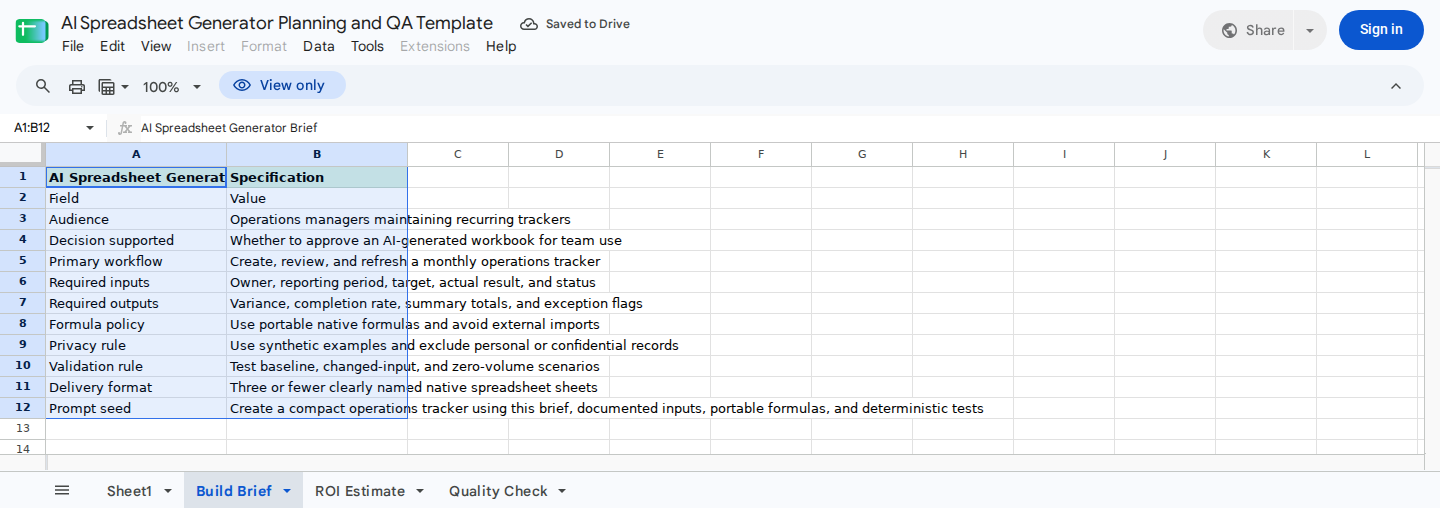
Complete the brief before requesting a generated workbook.
Use Build Brief!B12 as the prompt seed, then add the requirements from B3:B11. An anonymous CSV read of Build Brief!A1:B12 returned all 12 displayed rows. This result confirms only the displayed content; it doesn’t confirm formula recalculation or correct execution on other sheets.
Define the metric and validation rules
“Completion rate” is ambiguous when targets can be exceeded or lower values are better. For this illustrative tracker, use a bounded performance-to-target rate between 0% and 100%:
- Higher is better:
MIN(actual ÷ target, 100%) - Lower is better: return
100%when actual is at or below target; otherwise calculatetarget ÷ actual - Higher-is-better variance:
actual - target - Lower-is-better variance:
target - actual - Status: favorable when direction-adjusted variance is zero or positive
The lower-is-better rule handles a positive target with zero actual without division by zero: performance equals 100%.
If the business wants an above-target result such as 120%, label the metric attainment or performance-to-target ratio, not bounded completion. The unbounded higher-is-better ratio is actual ÷ target.
Also require a dedicated Validation result output. Apply this precedence when inputs are missing or invalid:
- Return
Incompleteif owner, reporting period, direction, target, or actual is blank or contains only spaces. - Otherwise, trim direction and ignore case. Return
Invalid directionunless it matchesHigher is betterorLower is better. - Otherwise, return
Invalid inputif target or actual isn’t numeric. - Otherwise, return
Invalid targetif target is zero or negative. - Otherwise, return
Invalid inputif actual is negative. - Otherwise, return
Valid.
Calculate variance, performance, and status only when validation returns Valid. Leave those outputs blank for every other result. These are requirements for the generated tracker, not behavior established by the planning template.
Generate and inspect a compact workbook
Ask the selected generator to create the smallest workbook that satisfies the brief. Then confirm that:
- Every required input and output is present.
- Manual inputs are distinguishable from calculated cells.
- Units, periods, sign conventions, and metric direction are labeled.
- Material outputs can be traced to source cells.
- Totals combine only comparable rows and units.
- Charts use the intended ranges and aggregation rules.
- Missing, invalid, zero, and above-target inputs follow the documented policy.
- External links and imports are visible and authorized.
- Formulas work on every required platform.
If source labels, dates, or blank rows need standardization first, follow a controlled process such as Google Sheets Data Cleaning for Finance.
Test both metric directions and validation precedence
Before testing, map the generated workbook’s input and output columns. Each case below is independent: reset the row to a known blank baseline, populate owner and reporting period with valid synthetic values unless the case says otherwise, and then enter the stated values.
| Case | Direction, target, and actual | Expected result |
|---|---|---|
| Above target, higher is better | Higher is better, 100, 120 | Valid; variance 20; performance 100%; favorable |
| Below target, higher is better | Higher is better, 100, 80 | Valid; variance -20; performance 80%; unfavorable |
| Zero actual, lower is better | Lower is better, 10, 0 | Valid; variance 10; performance 100%; favorable |
| Above limit, lower is better | Lower is better, 10, 12 | Valid; variance -2; performance about 83.33%; unfavorable |
| Normalized direction | HIGHER IS BETTER, 100, 80 | Valid after trimming and case normalization |
| Missing owner or period | Repeat with either field blank or spaces only | Incomplete; calculated outputs blank |
| Missing direction | Blank or spaces only, 100, 80 | Incomplete; calculated outputs blank |
| Missing target | Valid direction, target blank or spaces only, actual 80 | Incomplete; calculated outputs blank |
| Missing actual | Valid direction, 100, actual blank or spaces only | Incomplete; calculated outputs blank |
| Invalid direction | Up, 100, 80 | Invalid direction; calculated outputs blank |
| Nonnumeric target | Valid direction, one hundred, 80 | Invalid input; calculated outputs blank |
| Nonnumeric actual | Valid direction, 100, eighty | Invalid input; calculated outputs blank |
| Nonpositive target | Valid direction, 0 or -10, 5 | Invalid target; calculated outputs blank |
| Negative actual | Valid direction, 100, -1 | Invalid input; calculated outputs blank |
| Blank plus invalid target | Direction spaces only, target 0, actual 5 | Incomplete, proving missing-input precedence |
| Bad direction plus nonnumeric target | Up, target ten, actual 5 | Invalid direction, proving direction precedence |
| Nonnumeric target plus negative actual | Valid direction, target ten, actual -1 | Invalid input; calculated outputs blank |
These acceptance requirements weren’t part of the supplied template execution record. Run them against the generated workbook before approval.
Estimate buyer-specific cost and effort
On ROI Estimate, enter assumptions only in B3:B9. While evaluating the recorded example, leave B11:B17 unchanged and inspect their formulas before relying on the results.
The illustrative baseline used:
| Cell | Assumption | Input |
|---|---|---|
B3 | Monthly builds | 8 |
B4 | Manual hours per build | 3.5 |
B5 | Generation hours per build | 1.25 |
B6 | Review hours per build | 0.5 |
B7 | Labor cost per hour | 45 |
B8 | Monthly tool cost | 30 |
B9 | Months per year | 12 |
Recorded spreadsheet execution returned:
B11 = 28manual hours per monthB12 = 14generation and review hours per monthB13 = 14hours saved per monthB14 = 630gross monthly savingsB15 = 600net monthly savingsB16 = 7,200net annual savingsB17 = 0.05under the template’s current payback label
The control arithmetic through B16 is:
8 × 3.5 = 28manual hours8 × (1.25 + 0.5) = 14generation and review hours28 - 14 = 14hours saved14 × 45 = 630gross monthly savings630 - 30 = 600net monthly savings600 × 12 = 7,200net annual savings
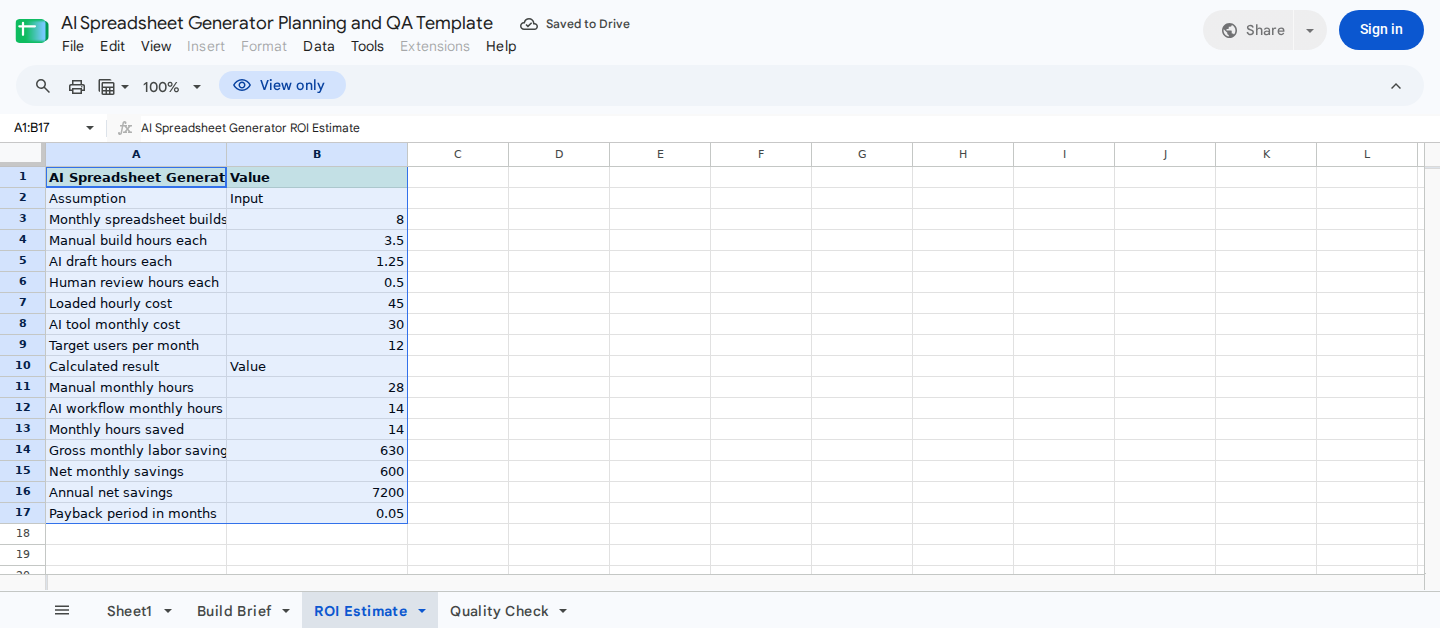
Estimate whether generation and review time justify the monthly tool cost.
Don’t interpret B17 as a conventional investment payback period. Its recorded 0.05 is consistent with 30 ÷ 630 ≈ 0.0476, meaning the monthly fee is about 4.76% of modeled gross monthly savings. Because both amounts recur monthly, this ratio doesn’t measure how long an upfront investment takes to pay back.
Inspect the existing formula. If it is confirmed as B8 ÷ B14, relabel the metric Monthly fee as % of gross monthly savings and use a nonnumeric result when gross savings aren’t positive:
=IF(B14<=0,"N/A",B8/B14)
In the recorded zero-volume case, changing B3 to 0 returned B11:B14 = 0, B15 = -30, B16 = -360, and B17 = 0 without a division error. That zero is the template’s sentinel for no recovery, not immediate payback. Until the label and handling are corrected, base the cost decision on B14:B16.
Apply a manual quality gate
On Quality Check:
- Retain or deliberately revise the weights in
B3:B7. - Confirm that
B9remains100. - Enter reviewer scores from
0through5inC3:C7. - Inspect contributions in
D3:D7and the result inB10:B11.
The recorded baseline used weights of 30, 25, 15, 20, and 10, with scores of 4, 5, 4, 5, and 5. It returned:
D3:D7 = 24, 25, 12, 20, 10B9 = 100B10 = 91B11 = Ready
These contributions agree with weight × score ÷ 5. For example, calculation accuracy contributes 30 × 4 ÷ 5 = 24.
In a recorded changed-input test, only Quality Check!C3 was reduced from 4 to 2. Its contribution fell from 24 to 12, the overall score dropped from 91 to 79, and B11 changed from Ready to Revise.
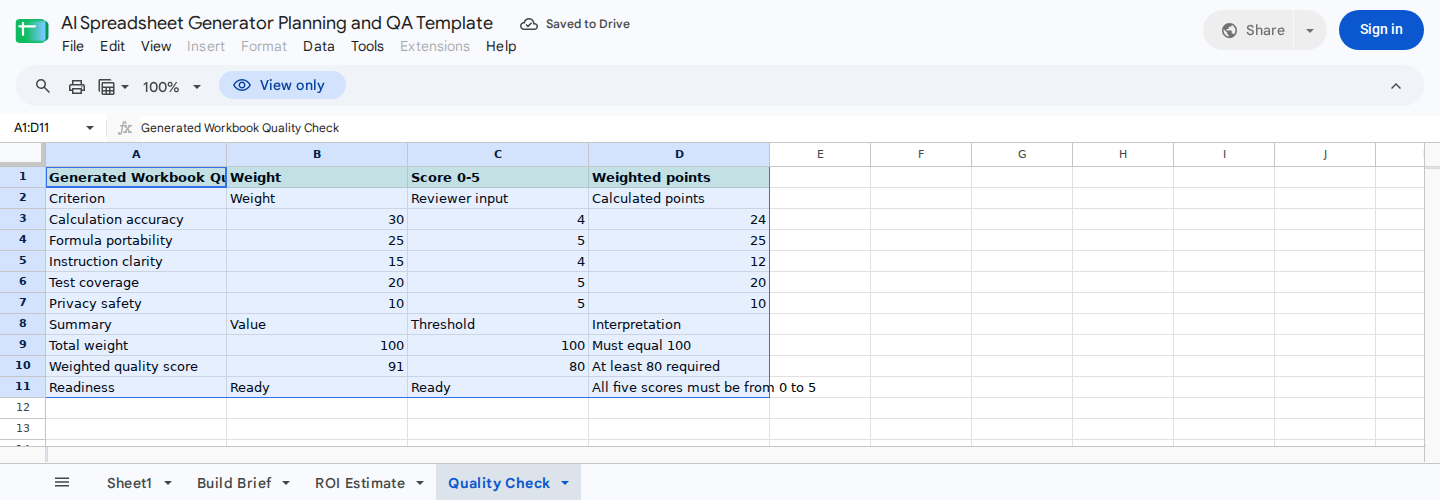
Score the generated workbook and use the readiness result as an approval gate.
The supplied evidence didn’t include the exact formulas, input-validation rules, or readiness threshold, so inspect those cells directly. A Ready label is a manual approval signal, not independent proof of formula accuracy, privacy compliance, or fitness for use.
Where ModelMonkey fits
ModelMonkey is an AI assistant for spreadsheet work in Google Sheets and Microsoft Excel. Users describe a task in natural language, and the assistant can inspect workbook context to help analyze, organize, and change spreadsheet content.
Supported task categories include:
- Reading and searching ranges
- Inspecting formula errors
- Scanning and analyzing tables
- Writing values and changing formatting
- Managing cells, rows, columns, and sheets
- Applying autofill and conditional formatting
- Working with notes and charts
In Google Sheets, the integration can pass the active spreadsheet, sheet, and range context to the agent service. Its write interface supports preview, approval, and rollback. This makes changes reviewable when the relevant workflow presents a preview.
However, an auto-approved execution path also exists, so don’t assume every edit requires manual approval. ModelMonkey doesn’t guarantee that every formula, analysis, or workbook change will be correct. The supplied evidence also doesn’t establish offline assistant operation.
To evaluate ModelMonkey for the demonstrated monthly-tracker job, complete Build Brief!B3:B11 and use B12 as the prompt seed. Then ask it to create or modify the tracker. Inspect the resulting formulas and source ranges, run the independent acceptance cases, and score the result in Quality Check!C3:C7. Approve it only after the formulas pass independent checks and Quality Check!B11 displays Ready.
When another approach may be better
Choose a conventional template when the process is stable, the required structure already exists, and only assumptions or periods change.
A manual build may be more efficient when the workbook is small, highly controlled, or unlikely to be reused. Specifying and reviewing generated work can take longer than building a small schedule directly.
Use a spreadsheet analyst when the model contains material accounting judgments, complex dependencies, unfamiliar source data, or controls that require formal ownership.
Consider scripted automation when stable rules must be repeated exactly. It requires explicit implementation, but its outputs can be tested against deterministic rules.
An AI spreadsheet generator may fit when workbook creation or modification recurs, the requirements can be stated clearly, and a qualified reviewer remains responsible for the result.