
Prices were checked on October 13, 2026. Google and Microsoft publish US individual subscriptions. Rows publishes prices in US dollars, although a US checkout wasn’t independently completed. Features may vary by account, plan, license, region, or tenant configuration.
Compare prices, platforms, and conditions
| Option | Published price | Spreadsheet environment | Capabilities and tradeoffs |
|---|---|---|---|
| Gemini in Sheets through Google AI Pro | $19.99/month on the US Google AI pricing page | Google Sheets | Google says Gemini can create sheets and complete tasks in existing Sheets files. An eligible Google AI or Workspace plan is required, and native Sheets files work best. |
| Copilot in Excel through Microsoft 365 Personal | $9.99/month for one person on Microsoft’s US pricing page | Microsoft Excel | Microsoft documents workbook editing in supported modes. Access and usage allowances vary by license; work accounts may also depend on tenant settings. |
| Rows Free | $0 | Rows standalone spreadsheet | A separate spreadsheet workspace. Check the current AI allowance before relying on it for recurring work. |
| Rows Plus | $8/user/month, or $6/user/month billed annually | Rows standalone spreadsheet | A paid individual tier. AI entitlements and usage limits are plan-specific, so confirm the current allowance. |
| Rows Pro | $79/month + $8/user, or $59/month + $6/user billed annually | Rows standalone spreadsheet | The base charge makes this more expensive than Plus for one person. Compare their features and allowances before subscribing. |
Rows publishes these prices on its pricing page, excluding applicable tax or VAT. Although Rows says it has joined Superhuman, it remains a separate spreadsheet product, not a Google Sheets extension or Excel add-in. Its documentation describes AI Analyst as a spreadsheet assistant and notes that usage limits depend on the plan.
Which option fits your workflow?
If your invoices, expense records, or cash plans already live in Google Sheets, Gemini in Sheets may be the most natural fit. Google’s Sheets documentation explains eligibility and supported creation and editing tasks. Before subscribing, confirm that your account and region are eligible.
For workbooks that must remain in Excel, consider Copilot in Excel. Microsoft 365 Personal is the documented individual subscription, but Microsoft’s Copilot in Excel FAQ shows that eligibility and features differ among licenses. Copilot can edit supported workbooks, but that doesn’t mean it creates complete workbooks or makes error-free changes.
Rows suits users who are comfortable moving their work into a separate spreadsheet environment. Compare its current AI allowance and import requirements with how often you expect to analyze or edit spreadsheets.
Before subscribing, ask:
- Must your files remain in Google Sheets or Excel?
- Does your account meet the documented eligibility rules?
- Does the price and usage allowance fit your expected monthly work?
Verify one known spreadsheet outcome
Whichever option you choose, test it on non-sensitive data with an answer you can calculate yourself.
Copy this Google Sheets template or download the Excel file. The Personal cashflow planner contains synthetic planning assumptions, not bank receipts or confirmed customer payments.
-
Open
Cashflow!A1:F12and inspect the baseline inA6:F12.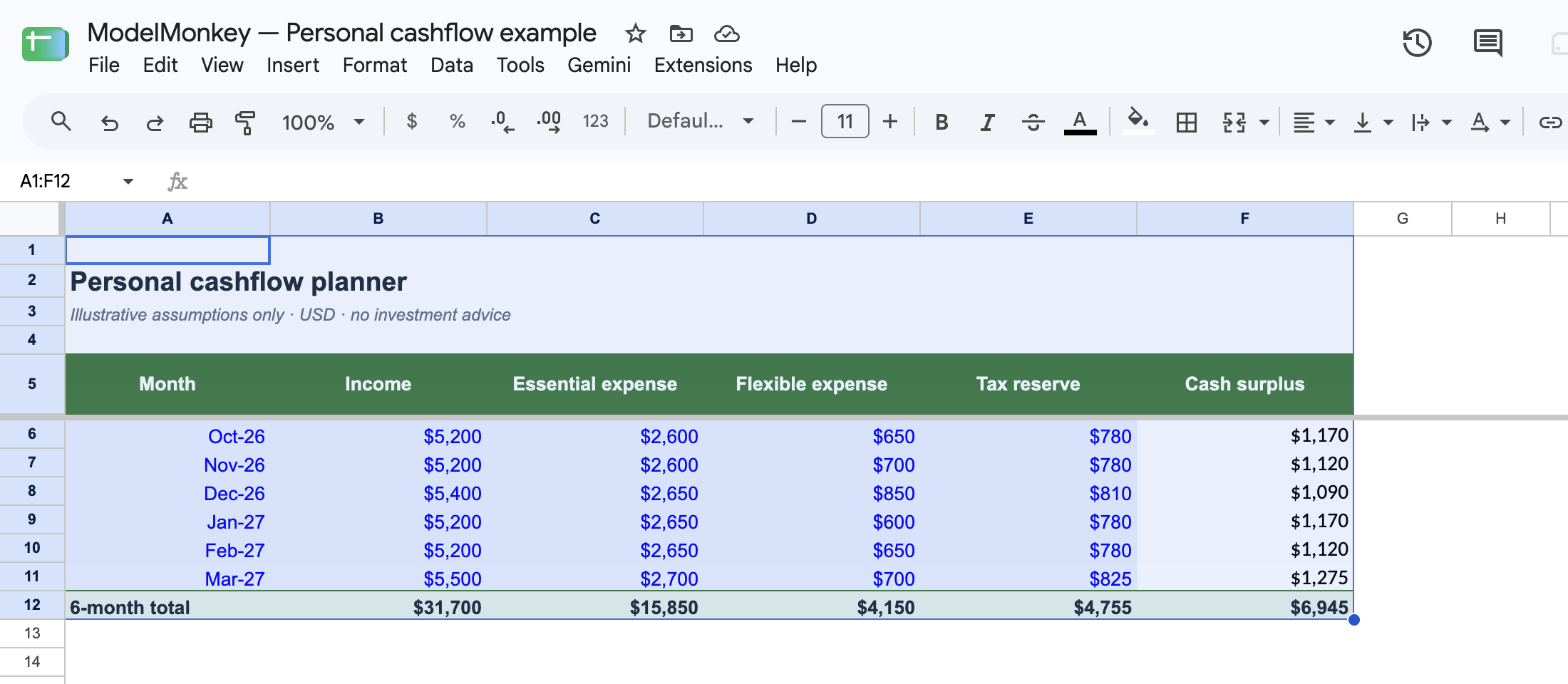
Actual Google Sheets screenshot of the restored synthetic example.
-
Reproduce the six input rows:
| Row | Month | Income (B) | Essential expense (C) | Flexible expense (D) | Tax reserve (E) | Surplus formula (F) | Result |
|---|---|---|---|---|---|---|---|
| 6 | Oct 2026 | 5200 | 2600 | 650 | 780 | =B6-C6-D6-E6 | 1170 |
| 7 | Nov 2026 | 5200 | 2600 | 700 | 780 | =B7-C7-D7-E7 | 1120 |
| 8 | Dec 2026 | 5400 | 2650 | 850 | 810 | =B8-C8-D8-E8 | 1090 |
| 9 | Jan 2027 | 5200 | 2650 | 600 | 780 | =B9-C9-D9-E9 | 1170 |
| 10 | Feb 2027 | 5200 | 2650 | 650 | 780 | =B10-C10-D10-E10 | 1120 |
| 11 | Mar 2027 | 5500 | 2700 | 700 | 825 | =B11-C11-D11-E11 | 1275 |
- Read
F12, whose formula is=SUM(F6:F11). The expected six-month planned surplus is6945. Income inB6:B11is expected income, not collected cash.
The control total is:
31700 income
- 15850 essential expenses
- 4150 flexible expenses
- 4755 tax reserve
= 6945 planned surplus
In a recorded native Google Sheets check, B6 was changed to 0 while C6:E6 remained at 2600, 650, and 780. Cell F6 returned -4030, after which the baseline was restored.
This verifies only the synthetic workbook’s arithmetic. It isn’t a Gemini, Copilot, Rows, or ModelMonkey integration test. After every AI-assisted change, review the formulas, references, formatting, and totals. For a broader planning method, see How to Forecast Freelance Income and Expenses.
Where ModelMonkey fits
Another option is ModelMonkey, an AI assistant for Google Sheets and Excel. It can inspect workbook context and help read ranges, work with formulas, organize data, change spreadsheet content, and adjust charts. When a workflow provides a preview, you can review proposed changes before proceeding.
This guide doesn’t include a verified ModelMonkey price or comparative performance result. To assess it for this task, explore ModelMonkey using a copy of the cashflow planner, then confirm that F6 and F12 still match the known results.