
It may suit you if bank syncing is your main requirement and Avery supports your institution and account type. If your data is already in Google Sheets or Excel, ModelMonkey may be a better fit for reading, analyzing, organizing, or changing it. This article isn’t based on a head-to-head test, and the cash-flow example below doesn’t test either product’s integration.
Avery versus ModelMonkey
| Decision point | Avery | ModelMonkey | Practical tradeoff |
|---|---|---|---|
| Primary purpose | Finance workflow for one-person businesses | General spreadsheet analysis and editing | Base your choice on the task you need to complete |
| Bank transactions | Advertises syncing from supported banks | Native bank syncing is not established by the supplied product evidence | Verify your bank and account type before choosing Avery |
| Spreadsheet work | Transaction review, suggested categories, and categorization rules | Can read, search, analyze, organize, format, and change spreadsheet content | ModelMonkey covers broader workbook tasks but does not replace a bank feed |
| Spreadsheet platforms | Google Sheets extension | Google Sheets and Excel | Relevant if you work across both spreadsheet platforms |
| Pricing evidence | Sheets plan listed at $90 annually when checked October 13, 2026 | No current price supplied for this comparison | Check live checkout terms before buying |
| Accuracy | Imports and categories should be reviewed | Formulas, analysis, and edits should be reviewed | Keep control totals and review the results from either product |
ModelMonkey can inspect active workbook context and help with formulas, tables, formatting, analysis, and charts. When a workflow includes a preview, you can review proposed changes before proceeding. You’ll still need to check each request and result.
What Avery’s Sheets plan includes
According to Avery’s pricing page, the Google Sheets plan includes:
- The Google Sheets extension
- Connections to supported bank accounts
- Transaction syncing
- Review of suggested categories
- Categorization rules
These are published product claims. They don’t establish that a particular account will connect or that every transaction will be categorized correctly. Before using the data for tax or cash decisions, compare the imported dates, amounts, currencies, and categories with your bank records.
The Google Workspace Marketplace listing advertises more than 10,000 banks across North America and Europe. It also labels the product as offering a free trial. That coverage is a vendor claim, not a guarantee that your institution is supported.
Price and trial terms
When retrieved on October 13, 2026, Avery listed these annual-billing prices:
| Plan | Monthly equivalent | Annual charge |
|---|---|---|
| Google Sheets | $7.50 | $90 |
| Pro | $24.17 | $290 |
| Business | $40.83 | $490 |
The monthly figures are annual prices divided by 12; they don’t indicate month-to-month billing. Avery says checkout shows the available trial duration, whether a card is required, the final price, and the billing period. Confirm those terms before subscribing. See Avery’s current pricing.
Bank and account checks
Avery says support varies by institution and account type. Before paying:
- Identify the exact bank and account type you want to connect.
- Confirm availability through Avery’s connection flow or support.
- Import a short period first if the available trial allows it.
- Compare the imported rows with an authoritative bank record.
- Check how transfers, refunds, duplicate-looking charges, and uncategorized transactions appear.
Professional accountant review isn’t included, according to Avery’s official site. The company also doesn’t promise tax filing, guaranteed deductions, or replacement of every accounting system. Review Avery’s product disclosures.
Installation and Google Sheets permissions
To get started, Avery’s installation guide directs users to install the extension from Google Workspace Marketplace. You’ll need a Google account that can edit the sheet, permission to access Google Sheets, and an Avery sign-in associated with a workspace, account, or plan.
The Marketplace permission summary says the add-on may “see, edit, create and delete all your Google Sheets spreadsheets.” That wording describes the access the extension may request. It doesn’t show that Avery reads or changes every spreadsheet.
Read the authorization screen before approving access. If the same Google account contains sensitive client work, consider whether the requested scope fits your confidentiality obligations and working practices.
Reproduce a separate cash-flow calculation
This Personal cashflow planner demonstrates native Google Sheets arithmetic only. It contains synthetic planning assumptions, not bank receipts or collected cash.
Copy this Google Sheets template or download the Excel file.
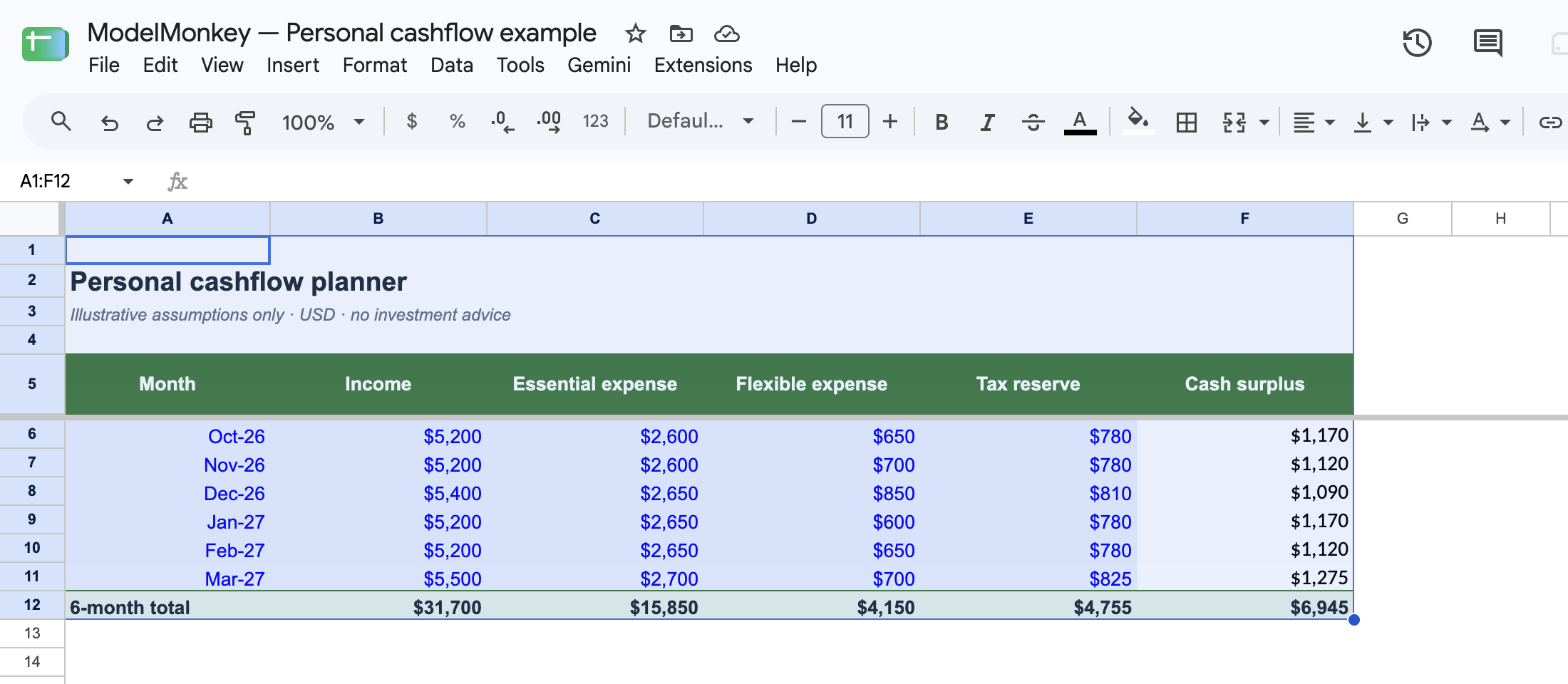
Actual Google Sheets screenshot of the restored synthetic example.
In Cashflow!A5:F12, the headers are Month, Income, Essential expense, Flexible expense, Tax reserve, and Cash surplus. The month values below are stored spreadsheet serial dates and displayed as formatted dates in the template.
| Row | A | B: Income | C: Essential | D: Flexible | E: Tax reserve | F: Formula and result |
|---|---|---|---|---|---|---|
| 6 | 46296 | 5200 | 2600 | 650 | 780 | =B6-C6-D6-E6 → 1170 |
| 7 | 46327 | 5200 | 2600 | 700 | 780 | =B7-C7-D7-E7 → 1120 |
| 8 | 46357 | 5400 | 2650 | 850 | 810 | =B8-C8-D8-E8 → 1090 |
| 9 | 46388 | 5200 | 2650 | 600 | 780 | =B9-C9-D9-E9 → 1170 |
| 10 | 46419 | 5200 | 2650 | 650 | 780 | =B10-C10-D10-E10 → 1120 |
| 11 | 46447 | 5500 | 2700 | 700 | 825 | =B11-C11-D11-E11 → 1275 |
Row 12 uses =SUM(B6:B11) through =SUM(F6:F11). The totals are:
- Income: 31,700
- Essential expenses: 15,850
- Flexible expenses: 4,150
- Tax reserve: 4,755
- Planned surplus: 6,945
The tie-out is 31700-15850-4150-4755=6945, matching F12. Expected income in B6:B11 is not confirmed cash.
One Google Sheets execution case was recorded: setting B6 to 0 while leaving C6=2600, D6=650, and E6=780 produced F6=-4030. Restore B6 to 5200 to return F6 to 1170.
Use B6:F6 only as a synthetic spreadsheet case. The screenshot and workbook don’t test Avery, ModelMonkey, Copilot, Gemini, or Rows. For a fuller planning method, see How to Forecast Freelance Income and Expenses.
Which product fits your task?
Choose Avery if you want to sync transactions from a supported bank into Google Sheets and you’re comfortable with its requested permissions. Confirm bank coverage and checkout terms first.
ModelMonkey is the more relevant option when your finance data is already in Google Sheets or Excel and you want help checking formulas, analyzing ranges, organizing data, or creating and adjusting spreadsheet content. For example, you could give it a copy of a planning sheet and ask it to inspect the surplus formulas and total. Check any proposed work against your control total before accepting changes.