
This guide uses 3 synthetic checks:
- A small sales workbook for confirming cells and formulas.
- A native Google Sheet with 10,000 data-row slots.
- A separate 50,000-row CSV stored in Google Drive.
Together, these checks cover read access. They don’t establish editing, write-back, automatic refresh, latency, file-size limits, CRM synchronization, or Excel execution.
What ChatGPT can access in Google Workspace
ChatGPT provides access to Google Docs, Sheets, and Slides through its Google Drive app. Availability depends on your ChatGPT plan, location, workspace configuration, granted permissions, and Google Workspace policies. The connected Google account must already have access to the requested file. OpenAI documents these availability and permission requirements.
Several controls apply independently:
- Google file role: Viewer, Commenter, or Editor access assigned through Drive.
- OAuth permission: Access granted when connecting the Google account to ChatGPT.
- ChatGPT workspace configuration: Whether the app and relevant actions are enabled.
- Google Workspace policy: Restrictions imposed by a managed organization.
- Administrator approval: Managed deployments may require approval from both ChatGPT and Google Workspace administrators.
Google’s Viewer, Commenter, and Editor roles determine how an account can use a shared file. However, those roles don’t show whether an external app can edit it. Google explains the file-sharing roles, while OpenAI’s Google app data controls FAQ covers connected-app permissions and workspace settings.
An ordinary individual connection provides live access to permitted files, but it doesn’t create a personal synchronized index of Drive. Administrator-managed Drive synchronization is a separate option for eligible managed workspaces.
Connect the correct Google account
If Google Drive is available for your ChatGPT account:
- Open ChatGPT’s app or connector settings.
- Select Google Drive.
- Sign in with the Google account that can already open the target spreadsheet.
- Review the permissions on Google’s authorization screen.
- Return to ChatGPT and request the file by its URL or exact name.
- Verify the file identity, tab name, range, and returned values in Google Sheets.
Menu names may vary by account or workspace configuration. If Google Drive is missing, compare your plan, location, workspace settings, and administrator policies with OpenAI’s current setup guide.
Start with a read-only request:
Read
Deals!A1:H18from this connected Google Sheet. Report the values or formulas inD11,E11,G11, andB6. Do not modify cells, sharing, or file settings. If the requested range is unavailable, state that limitation instead of estimating the values.
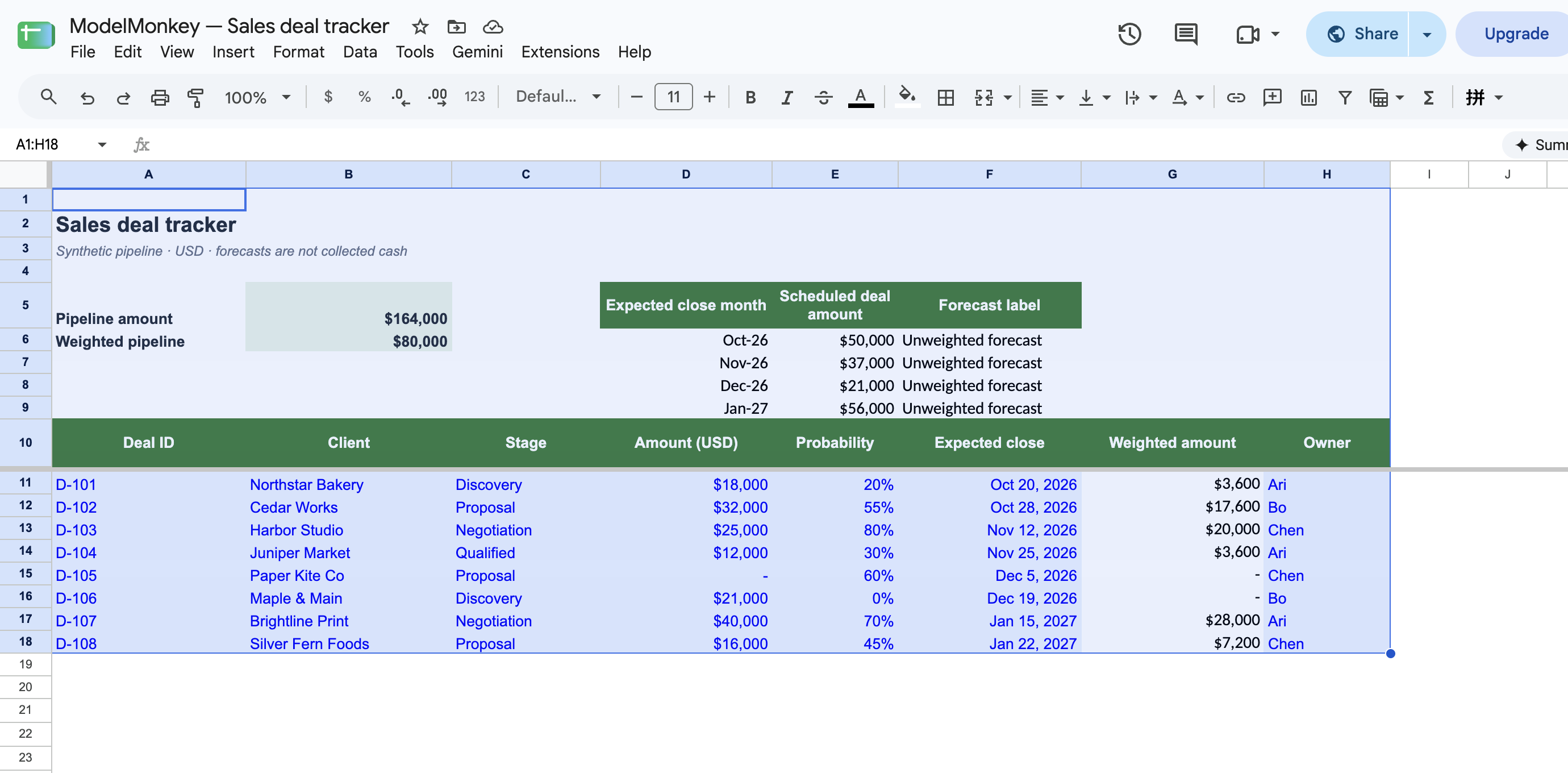
Compare the response with the open spreadsheet. Matching the workbook title isn’t sufficient evidence of retrieval. The requested cell values must also match.
Verify a native Google Sheets range
Begin with a small probe before requesting a complete table. In the recorded test, the connector retrieved spreadsheet metadata and read Connector probe!A1:B10 using unformatted values. Values withheld from the prompt matched the returned range.
A successful probe confirms read access to that particular file and range. It doesn’t prove access to every file in the Workspace account.
Run the 10,000-row read-only check
Copy the native Google Sheets practice workbook
Download native 10000-row workbook
The synthetic workbook contains:
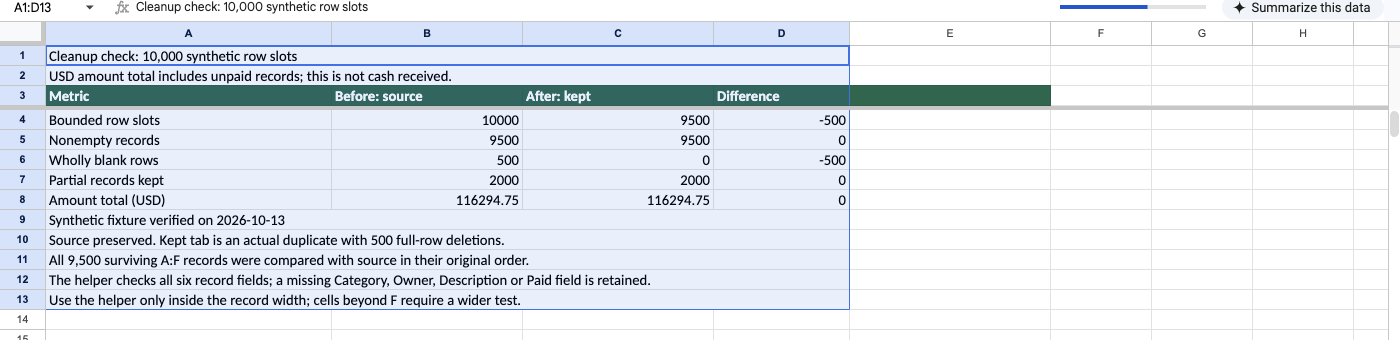
Connector probe, used for the small withheld-value check.Cleanup source 10k, containing a header and 10,000 bounded data-row slots.Cleanup controls, containing comparison totals.
Ask ChatGPT:
Read only
Cleanup source 10k!A1:H10001through the connected Google Drive app using unformatted values. Report the number of returned rows and whether the result was truncated. Using columns A:F, count the bounded data-row slots, nonempty records, wholly blank rows, and nonempty records missing at least one A:F field. Sum Amount USD in column D. Do not use a summary tab or uploaded export.
The recorded connector result returned 10,001 rows, including the header. An independent verifier then recalculated these controls from the returned source matrix:
| Control | Recorded result |
|---|---|
| Bounded data-row slots | 10,000 |
| Nonempty records across A:F | 9,500 |
| Wholly blank rows across A:F | 500 |
| Nonempty records missing at least one A:F field | 2,000 |
| Amount USD total | $116,294.75 |
The 2,000 partial records are part of the 9,500 nonempty records. The amount is a synthetic pipeline total that includes unpaid records, not collected cash.
The recorded connector trace assigned the matrix the SHA-256 value 4f4c5507c8b13f5aeebc0ef8fd3c65f863c5d7ad8286fd8bb9c665f70defe9ca. Because the serialization procedure used to create it wasn’t published, this is a trace-specific identity value rather than a reproducible workbook-file hash.
Check that:
- The response accounts for the header plus all 10,000 bounded data slots, including wholly blank rows.
- Its controls match the
Cleanup controlstab. - It can return several source records that weren’t included in your prompt.
- It used the requested native range rather than a summary tab or uploaded export.
- It reports any truncation instead of presenting partial data as complete.
For this synthetic workbook, the connector returned the complete native matrix, and an independent verifier recomputed the controls. However, the trace didn’t separately establish that ChatGPT itself executed that recomputation.
Interpret the Sales deal tracker
Copy the Sales deal tracker in Google Sheets or download the Excel file. The recorded native execution used Google Sheets, not Excel.
Deals!A11:H18 contains 8 manually entered synthetic records:
| Deal ID | Client | Stage | Amount | Probability | Close-date serial | Weighted amount | Owner |
|---|---|---|---|---|---|---|---|
| D-101 | Northstar Bakery | Discovery | 18000 | 0.2 | 46315 | 3600 | Ari |
| D-102 | Cedar Works | Proposal | 32000 | 0.55 | 46323 | 17600 | Bo |
| D-103 | Harbor Studio | Negotiation | 25000 | 0.8 | 46338 | 20000 | Chen |
| D-104 | Juniper Market | Qualified | 12000 | 0.3 | 46351 | 3600 | Ari |
| D-105 | Paper Kite Co | Proposal | 0 | 0.6 | 46361 | 0 | Chen |
| D-106 | Maple & Main | Discovery | 21000 | 0 | 46375 | 0 | Bo |
| D-107 | Brightline Print | Negotiation | 40000 | 0.7 | 46402 | 28000 | Ari |
| D-108 | Silver Fern Foods | Proposal | 16000 | 0.45 | 46409 | 7200 | Chen |
Column F contains spreadsheet serial dates displayed with date formatting. These rows are manual deal-data inputs, not evidence of a CRM connection.
The baseline controls are:
| Cell or range | Formula | Expected result |
|---|---|---|
B5 | =SUM(D11:D18) | 164000 |
G11 | =D11*E11 | 3600 |
G12:G18 | Corresponding amount × probability formulas | 17600, 20000, 3600, 0, 0, 28000, 7200 |
B6 | =SUM(G11:G18) | 80000 |
These formulas assume numeric amounts and probabilities from 0 through 1, but they don’t enforce that range or contain type guards. As a result, negative probabilities, values above 1, pasted text, malformed values, or whitespace-only inputs can produce misleading results or formula errors.
Check the zero-probability boundary
This case was executed and recorded in native Google Sheets:
- Confirm that
D11=18000,E11=0.2,G11=3600, andB6=80000. - Set
E11to0. - Confirm that
G11becomes0andB6becomes76400. - Check that deal
D-101remains in row 11. - Restore
E11to0.2. - Confirm that
G11returns to3600andB6returns to80000.
This confirms the stated behavior in the synthetic workbook. It doesn’t show that ChatGPT performed the edit.
Compare weighted and unweighted forecasts
D6:D9 contains these month starts:
| Cell | Displayed date | Underlying serial |
|---|---|---|
D6 | October 1, 2026 | 46296 |
D7 | November 1, 2026 | 46327 |
D8 | December 1, 2026 | 46357 |
D9 | January 1, 2027 | 46388 |
Enter this formula in E6 and fill it through E9:
=SUMIFS($D$11:$D$18,$F$11:$F$18,">="&D6,$F$11:$F$18,"<"&DATE(YEAR(D6),MONTH(D6)+1,1))
The expected results are:
| Cell | Expected value |
|---|---|
E6 | 50000 |
E7 | 37000 |
E8 | 21000 |
E9 | 56000 |
Each formula includes expected-close dates on or after the month’s first day and excludes the first day of the following month. It counts every deal amount in the period regardless of stage or probability. Some spreadsheet locales use semicolons instead of commas as formula separators.
The 2 measures answer different questions:
E6:E9contains unweighted scheduled deal amounts by expected-close month.B6contains the probability-weighted amount across all 8 deals.
Neither represents payments received or collected cash.
For a related spreadsheet workflow, see Google Sheets artificial intelligence for FP&A.
Verify a separate 50,000-row Drive CSV
The CSV check uses a synthetic USD deal-pipeline file stored in Google Drive. This file is separate from the native Google Sheets test.
Download the synthetic 50000-row CSV
Download the read-only Python verifier
The file identity controls are:
- Byte count:
3,573,554 - SHA-256:
4085a49b36b1aba6ff96fd735bdb58cf4ed28692fb0de9a51e316e1ab2dc8f11 - First-row
transport_probe:2855e521a247dc03bb9cb46a7bac8ea5 - Last-row
transport_probe:7a342247d77950b8e0d85c5081a4561e
The recorded ChatGPT prompt contained no attachment, expected hash, or probe values. The browser showed a Google Drive review, while the returned hash and probes matched the withheld controls. The complete raw provider trace wasn’t independently inspected.
Independent read-only parsing of the published file produced:
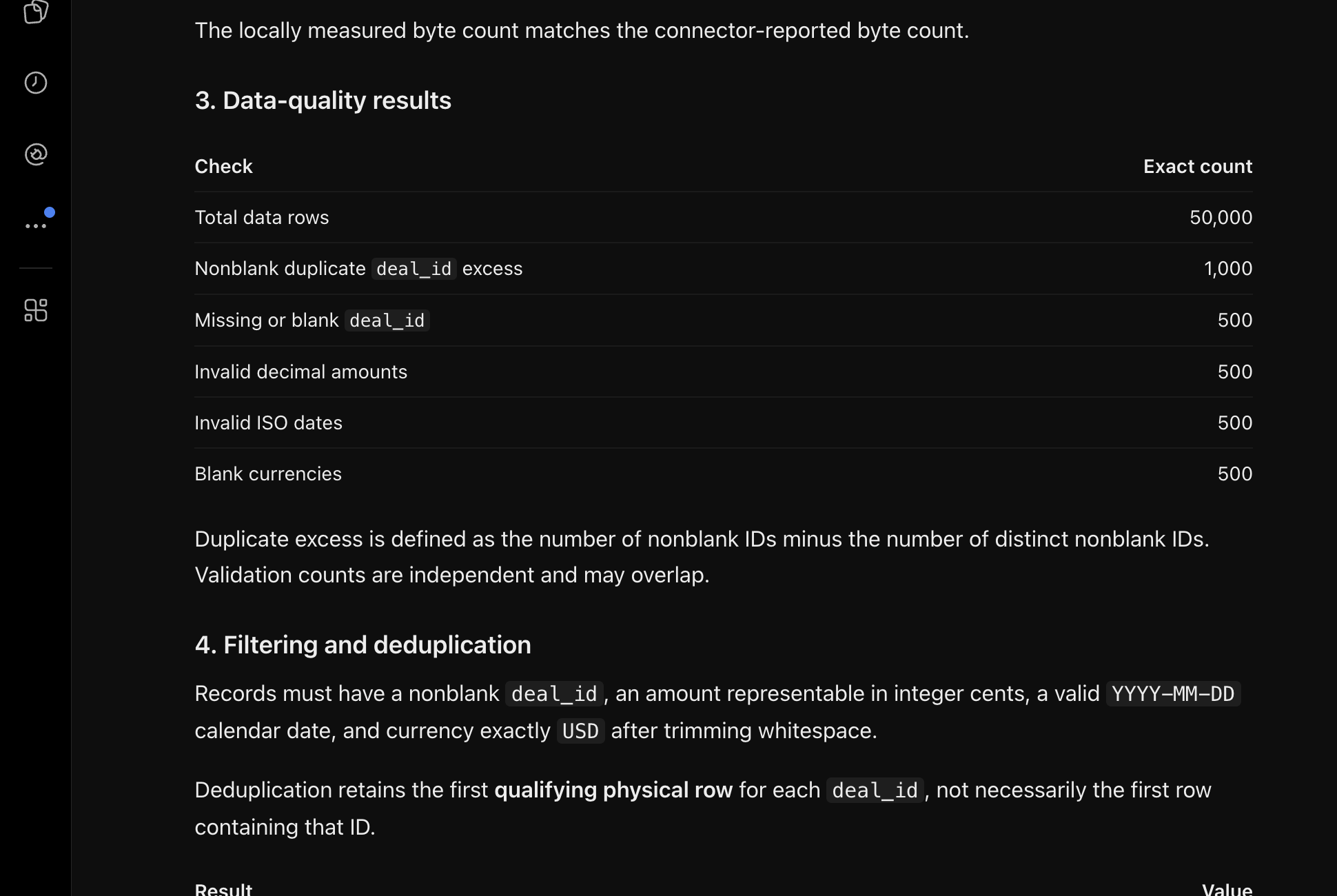
| Check | Expected result |
|---|---|
| Data rows excluding the header | 50,000 |
| Missing deal IDs | 500 |
| Invalid decimal amounts | 500 |
| Invalid calendar dates | 500 |
| Blank currencies | 500 |
| Valid rows before deduplication | 48,000 |
| Duplicate excess among qualifying rows | 1,000 |
| Valid rows after deduplication | 47,000 |
| All parseable amounts | $497,399,830.00 |
| Cleaned unique amount | $472,279,025.00 |
The 4 invalid categories occur on distinct rows, and validation happens before deduplication. The verifier then retains the first qualifying physical row for each ID and sums amounts as integer cents. It doesn’t convert invalid amounts to zero.
The linked Python verifier defines the CSV rules, including trimming, whitespace handling, accepted decimal syntax and precision, date validation, currency matching, and deduplication order. Use that script instead of recreating its qualification rules from the summary above.
These totals are synthetic pipeline amounts, not collected cash.
Reproduce the CSV check
Place a copy of the CSV in Google Drive and connect the Google account that can open it. Then request:
Read only the synthetic CSV at
[Drive file URL]through Google Drive. Do not modify files, change sharing, or search unrelated files. Retrieve the full raw file and report its byte count, SHA-256, and first and lasttransport_probevalues. Apply the linked verifier’s validation and deduplication rules, report every control it produces, and stop if only an excerpt is available.
Run the local verifier independently:
python3 workspace-sales-audit.py workspace-dirty-sales-50000.csv
Compare:
- File name
- Byte count and SHA-256
- Total row count
- First and last probe values
- Validation and deduplication counts
- Amount totals
- Several records withheld from the prompt
Any identity or control mismatch means the verification didn’t pass. Preserve the original file, and isolate invalid rows instead of silently treating invalid amounts as zero.
This test provides retrieval evidence for one Drive CSV. It doesn’t establish native Google Sheets behavior. The 10,000-row test provides separate evidence for that path.
Troubleshoot failed access
ChatGPT cannot find the file
First, confirm that the connected Google account can open the exact Drive URL. Next, check the file ID, app availability, OAuth permissions, and workspace policy.
During the recorded CSV test, an intentionally invalid all-zero file ID produced a browser-reported 404 NOT_FOUND. Correcting the file ID resolved the lookup. The underlying provider HTTP response wasn’t independently inspected.
ChatGPT finds the workbook but not its cells
Request a bounded tab and range, along with several values withheld from the prompt. A matching file name or summary doesn’t prove that source cells were retrieved.
If the result contains only excerpts, don’t treat calculated totals as a full-source audit.
Access is denied
Check each permission layer separately:
- The connected Google account
- The file’s Drive sharing role
- The OAuth scopes granted to ChatGPT
- ChatGPT workspace app and action settings
- Google Workspace administrator restrictions
Managed organizations may need both a ChatGPT administrator and a Google Workspace administrator to approve the relevant access.
Reading works but editing does not
Read access and file-changing actions are distinct. Editing, creating, moving, sharing, or deleting files requires the corresponding Google permissions and enabled ChatGPT actions. ChatGPT may also request confirmation. The tests in this guide didn’t exercise those actions.
Keep spreadsheet changes verifiable
Before requesting an edit, specify the spreadsheet, tab, cells, intended formula or value, and expected control total. After the action, reopen the affected range and compare the result with the control.
ModelMonkey is a separate assistant for Google Sheets and Excel. It can inspect workbook context and help read, analyze, organize, format, and change spreadsheet content. When its workflow presents a preview, you can review proposed changes before proceeding. Not every write path necessarily waits for manual approval.
For this example, copy the Sales deal tracker and ask ModelMonkey to inspect Deals!D11:G18, explain the weighted-amount formulas, and identify inconsistent formulas or values. Before proceeding, verify any proposed change against G11 and B6.