
Build a 12-Month Cash Flow Projection
Copy a 12-month cash flow template to project receipts, payments, ending cash, and monthly operating-buffer shortfalls.
A 12-month cash flow projection should show expected receipts and payments, cleared actuals, month-end cash, and any shortfall against your minimum operating buffer. This template gives finance and FP&A teams a practical way to build and maintain that view.
Use the 12-Month Cash Flow Projection and Actuals Template in either format:
The workbook contains illustrative 2027 data. Before replacing the sample assumptions and cash records, check the baseline controls.
What You'll Need
- Google Sheets or Microsoft Excel
- Your opening cleared cash balance
- A minimum operating cash buffer
- Expected receipts and payments for the next 12 months
- Cleared amounts for any fully reconciled months
Step-by-Step Guide
Check that the template fits your process
A useful cash flow projection distinguishes expected cash from cleared cash. It also shows timing risk, not just a year-end total.
| Criterion | This template provides | Tradeoff or control |
|---|---|---|
| 12-month coverage | January through December in I:T | The projection covers one year at a time |
| Actual versus forecast | Actual net cash through the cutoff in B6, then forecast net cash | Advance the cutoff only after reconciliation |
| Transaction-level support | One expected receipt or payment per row in A24:J100 | The supported entry range is bounded at row 100 |
| Buffer-risk visibility | Ending cash, buffer headroom, and monthly status in rows 18-20 | The operating buffer in B5 is a management assumption |
| Ongoing maintenance | Forecast timing, actual clearing data, status, and notes | Reconciliation and exception review are manual |
| Available formats | Google Sheets copy and supplied XLSX download | Recorded execution applies to Google Sheets, not Excel |
The workbook doesn’t import bank transactions or reconcile accounts automatically. Instead, it provides a manually maintained cash forecast with a visible forecast-to-actual cutoff.
Verify the untouched baseline
Before changing any assumptions or records, confirm that your copy contains:
Cash Flow!B4: $14,000Cash Flow!B5: $12,000Cash Flow!B6: 3Cash Flow!G24: $12,000
The blended monthly net cash amounts should be:
| Period | Net cash used |
|---|---|
| January | -$3,200 |
| February | $5,700 |
| March | $2,500 |
| April | $6,000 |
| May | $6,500 |
| June | $2,500 |
| July | $8,000 |
| August | $4,000 |
| September | -$4,000 |
| October | $8,000 |
| November | $6,500 |
| December | $2,000 |
January through March contribute $5,000 of actual net cash. The remaining months, April through December, contribute $39,500 of forecast net cash:
December ending cash
= $14,000 opening cash
+ $5,000 actual net cash
+ $39,500 forecast net cash
= $58,500
Recorded Google Sheets execution produced these controls:
E4: $58,500 ending cashE5: $10,800 lowest month-end cashE6: 1 month below the buffer
If your untouched copy differs, check B4:B6, G24, and the formulas in E4:E6 and I12:T20 before entering your data.
The supplied evidence contains calculated values rather than the underlying formula text. It verifies these recorded outputs, but it doesn’t provide an independent static audit of the summary ranges, aggregation criteria, direction matching, or blank-handling rules.
Enter the projection assumptions
Replace the illustrative values in Cash Flow!B4:B8.
| Cell | Input | Illustrative value |
|---|---|---|
B4 | Opening cleared cash | $14,000 |
B5 | Minimum operating cash buffer | $12,000 |
B6 | Last fully reconciled month, 0-12 | 3 |
B7 | Projection year | 2027 |
B8 | Manual review date | 2027-03-31 |
With B6 = 3, row 17 uses actual net cash for January through March, followed by forecast net cash for April through December. Enter 0 when no month has reconciled actual data. In the recorded Google Sheets scenario, forecasts were then used for all 12 months.
The review date in B8 records when the forecast was reviewed. It doesn’t determine which months use actuals.
Don’t overwrite the formulas in E4:E6 or I12:T20.
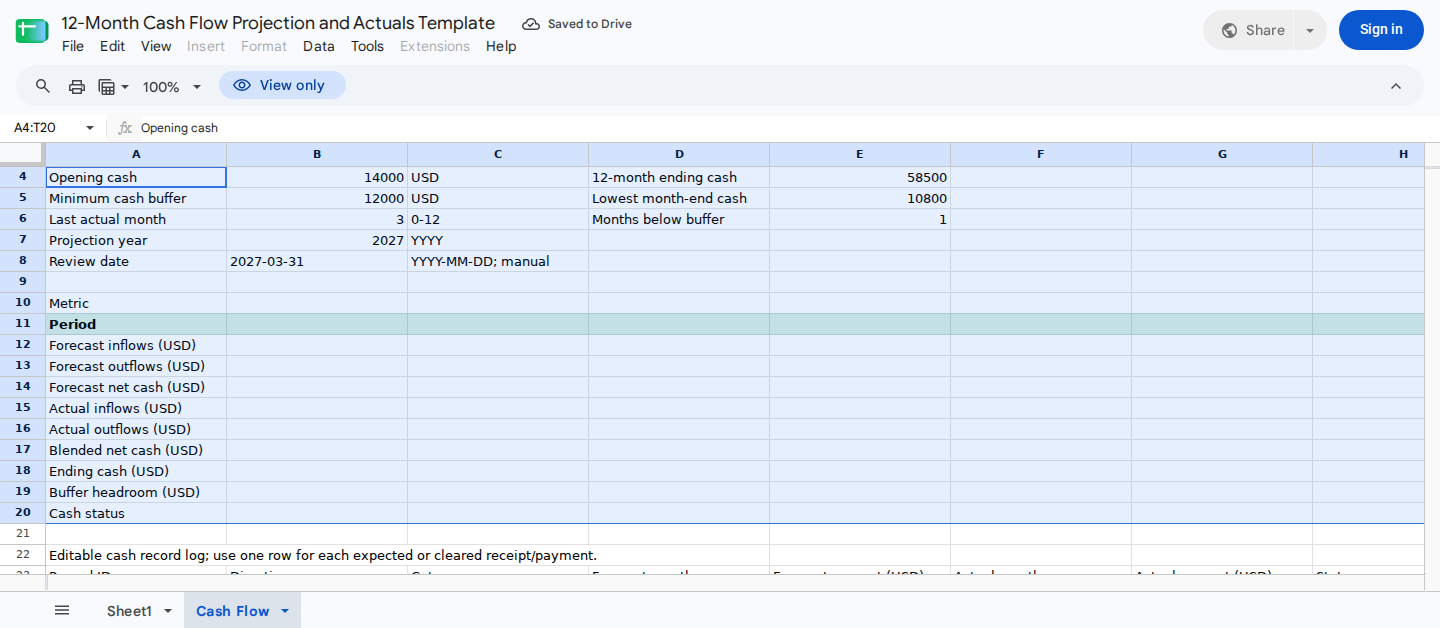
This summary combines cleared cash through the selected actual month with forecast cash afterward. It also flags month-end balances below the operating buffer.
Replace the illustrative cash records
Replace the synthetic records in Cash Flow!A24:J72. Then enter subsequent records through row 100, keeping one expected receipt or payment per row.
| Column | Field | When to complete it |
|---|---|---|
A | Unique record ID | For every record |
B | Exactly Inflow or Outflow | For every record |
C | Cash-flow category | For every record |
D | Forecast month from 1 to 12 | For every forecast record |
E | Forecast cash amount | For every forecast record |
F | Actual clearing month from 1 to 12 | Only after cash clears |
G | Actual cleared amount | Only after cash clears |
H | Manual status | When useful for review |
I | Description | When useful for review |
J | Exception note | For changes or exceptions |
Enter amounts as positive numbers. Column B determines whether each amount is an inflow or outflow.
Leave columns F and G blank until the cash clears. Don’t enter a zero or placeholder for an uncleared item.
Keep the headers in A23:J23. Because the existing summary covers records through row 100, entries within A24:J100 require no formula copying.
Also exclude transfers between bank accounts owned by the same business. Recording both sides would increase reported inflows and outflows without changing available business cash.
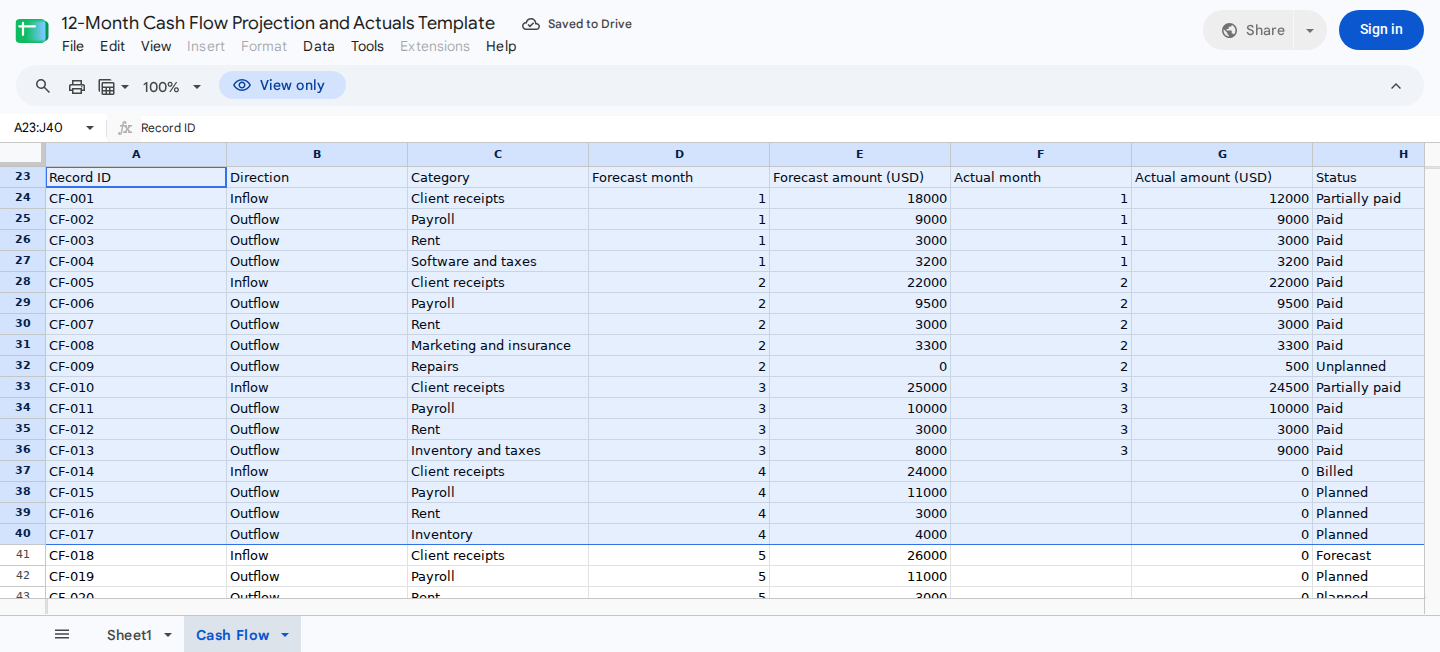
The record log distinguishes expected cash from cleared cash. Partial payments, billed invoices, and unplanned payments are represented separately.
Record actual cash and reschedule unpaid items
Enter an actual month in column F and an actual amount in column G only after cash enters or leaves the account. A billed invoice remains a forecast receipt until payment clears.
For an illustrative $18,000 January receipt when only $12,000 clears:
- Enter the actual month in column F and
$12,000in column G. - Change column E on that original row to
$12,000. - Keep its January forecast month in column D.
- Record the original $18,000 estimate and the $6,000 remainder in column J.
- Add one future inflow row with the revised expected clearing month in column D and
$6,000in column E.
Together, the 2 forecast records total $18,000: $12,000 on the original row plus $6,000 on the future row. If you leave the original forecast at $18,000 and add a $6,000 remainder, forecast inflows will be overstated by $6,000.
For a completely unpaid invoice or bill, leave columns F and G blank. If its forecast month is at or before the reconciled cutoff in B6, use one of these methods:
- Move the existing record’s forecast month in column D to the revised future clearing month.
- Create a replacement future record, but remove the active amount from the old record so the outstanding cash appears only once.
Because row 17 uses actual net cash for reconciled months, an uncleared item left only in an old forecast month can disappear from the forward blended projection.
Use columns H through J to document partial, overdue, rescheduled, or unplanned items. These are manual fields, and the supplied evidence doesn’t establish that status text controls summary inclusion.
Read the monthly cash outlook
The summary runs from January in column I through December in column T.
| Row | Measure |
|---|---|
12 | Forecast inflows |
13 | Forecast outflows |
14 | Forecast net cash |
15 | Actual cleared inflows |
16 | Actual cleared outflows |
17 | Blended net cash |
18 | Ending cash |
19 | Buffer headroom |
20 | Cash status |
In the illustrative January baseline:
Actual net cash = $12,000 actual inflows - $15,200 actual outflows
                = -$3,200

Ending cash = $14,000 opening cash - $3,200
            = $10,800

Buffer headroom = $10,800 ending cash - $12,000 buffer
                = -$1,200
The corresponding results are:
I17: -$3,200I18: $10,800I19: -$1,200I20:Below buffer
A negative value in row 19 measures the shortfall against the operating buffer. It doesn’t necessarily mean the bank balance is negative.
Complete the monthly review
At each review:
- Update the manual review date in
B8. - Enter newly cleared months and amounts in columns F and G.
- Review partial and overdue items in columns H through J.
- Move completely unpaid items from reconciled months to revised future clearing months, or replace them without retaining a duplicate active forecast.
- Split partial receipts or payments so the cleared and outstanding portions don’t duplicate the active forecast.
- Revise future forecast amounts in column E.
- Advance
B6only after the next month is fully reconciled. - Review ending cash, buffer headroom, and status in rows 18 through 20.
- Investigate each projected balance below the buffer.
When starting a new projection year, enter the prior year’s final cleared cash in B4, update B7 and B8, and reset B6 to 0. Replace the records in A24:J100, but leave the summary formulas unchanged.
For a closer analysis of shortfall timing, see how to forecast cash runway in Excel or Google Sheets. For planning beyond 12 months, use the 3-year cash flow projection example.
Use ModelMonkey to review the workbook
ModelMonkey can inspect spreadsheet context and help analyze, organize, or change content in Google Sheets and Excel. For this projection, give it a specific task such as:
- “Check
Cash Flow!A24:J100for blank forecast months or amounts.” - “List unpaid records whose forecast month is at or before the cutoff in
B6.” - “Explain the January buffer shortfall using
B4,B5, andI15:I20.” - “Summarize the months with negative buffer headroom.”
- “Apply these approved forecast-month changes to the specified record IDs.”
When the workflow presents a preview, review the proposed changes before proceeding. Finance should still verify cash classifications, forecast timing, formulas, and control totals.
Wrapping Up
This projection combines cleared actual cash with future receipts and payments to show 12 months of ending cash and buffer risk. Keep B6 aligned with the last fully reconciled month, reschedule uncleared items that would otherwise fall behind that cutoff, and make sure each outstanding amount appears only once in the active forecast.
Frequently Asked Questions
What is the difference between a cash flow projection and a cash flow statement?
A cash flow projection estimates future receipts and payments, while a cash flow statement reports historical cash activity. This template combines actual cleared cash through the month selected in B6 with forecasts for the remaining months.
Should unpaid invoices remain in their original forecast month?
Only if that month is after the reconciled cutoff in B6. Otherwise, move the existing record in column D to the expected future clearing month. You can also create a replacement future record after removing the old active forecast. Don’t retain 2 active records for the same outstanding cash.
How should I record a partial receipt?
Enter the cleared portion in column G and its actual month in column F. On the original row, reduce column E to the cleared portion and document the original estimate in column J. Then add one future inflow row for the outstanding amount so it remains in the forward projection without being counted twice.
What should I enter if no month has actual data?
Enter 0 in Cash Flow!B6. In the recorded Google Sheets scenario, row 17 then used forecast net cash for all 12 months.
Can I add records without copying formulas?
Yes, within the supported Cash Flow!A24:J100 range. The existing summary formulas cover that range. Support beyond row 100 hasn’t been established.
Do record statuses affect the projection?
Status in column H is a manual documentation field. The supplied evidence doesn’t establish that values such as Paid, Planned, or Partially paid determine inclusion. Use the forecast and actual month and amount fields to control timing, then check the summary.
Does the template validate every entry?
That behavior hasn’t been established. Use exactly Inflow or Outflow, month numbers from 1 to 12, unique IDs, positive amounts, and a B6 value from 0 to 12.
Because the formula text and validation rules weren’t supplied, this guide can’t confirm whether blank, zero, negative, misspelled, differently cased, noninteger, or out-of-range inputs are rejected, ignored, or silently alter the totals. Review those fields manually.
Can I independently audit the summary formulas from this guide?
No. The recorded Google Sheets results support the stated outputs, but the supplied evidence doesn’t expose the formula text in E4:E6 or I12:T20. Inspect those formulas in your copy if you need to verify their exact ranges, criteria, and blank-handling behavior.
Are the Excel results verified?
Equivalent Excel execution wasn’t recorded. After opening the file, recalculate it and compare E4:E6, I17:I20, and T18 with the baseline controls in this guide.
Does the template reconcile with a bank account automatically?
No. Enter actual months and cleared amounts after reconciling them to the account. You must also exclude transfers between accounts owned by the same business.