
Download a Free 12-Month Cash Flow Excel Template
Download a free 12-month cash flow Excel template, enter monthly receipts and payments, and identify projected cash shortfalls.
Download the free 12-month cash flow Excel template, replace the illustrative figures with your monthly forecast, and review the closing balances for potential cash shortfalls. You can also copy the Google Sheets template.
This workbook is a cash-planning schedule for finance and FP&A analysts. It isn’t an accounting statement of cash flows or a complete three-statement model.
What You'll Need
- Microsoft Excel for the
.xlsxfile, or access to Google Sheets - Cash available at the beginning of January
- Monthly estimates for cash receipts and payments
- One consistent currency for all inputs
Step-by-Step Guide
Download or copy the template
Choose a format:
Before editing, save an untouched copy. The recorded spreadsheet execution covers the Google Sheets baseline and the checks described below.
Independent execution evidence for the downloaded Excel file wasn’t supplied, so Excel users should complete the January control in Step 4.
Understand the monthly cash flow structure
Open the Cash Flow sheet. Columns B:M cover January through December.
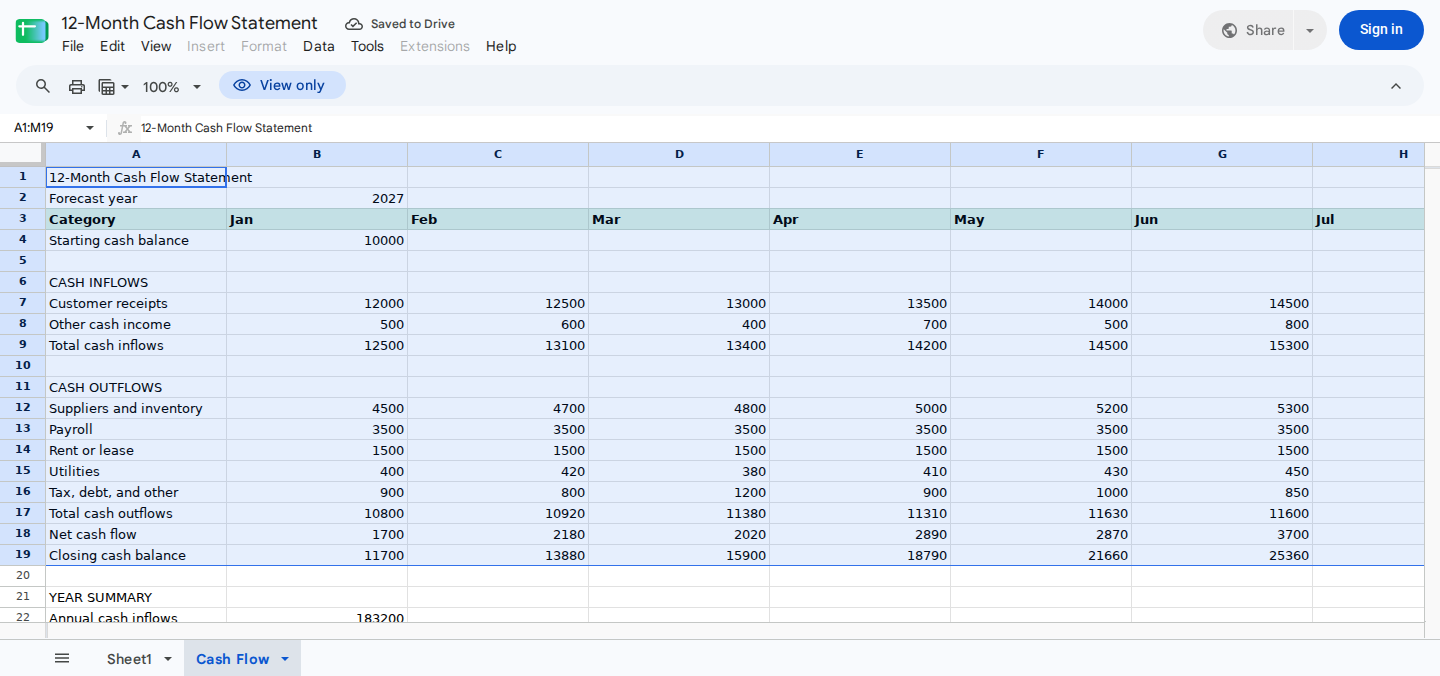
Main statement area showing the synthetic monthly example and rolling cash position.
The main ranges are:
| Range | Purpose |
|---|---|
B2 | Forecast year |
B4 | Cash available at the beginning of January |
B7:M8 | Monthly cash inflow inputs |
B9:M9 | Calculated total cash inflows |
B12:M16 | Monthly cash outflow inputs |
B17:M17 | Calculated total cash outflows |
B18:M18 | Calculated net cash flow |
B19:M19 | Calculated closing cash balances |
B22:B27 | Annual totals and liquidity indicators |
The calculation logic is straightforward:
- Monthly inflows equal customer receipts plus other cash income.
- Monthly outflows equal the 5 payment categories.
- Net cash flow equals inflows minus outflows.
- January closing cash equals starting cash plus January net cash flow.
- Each later closing balance equals the prior closing balance plus the current month’s net cash flow.
Enter opening cash only in B4. Don’t repeat it as income in later months.
Enter the forecast inputs
Update the template in this order:
- Enter the forecast year in
Cash Flow!B2. - Enter beginning cash in
Cash Flow!B4. - Replace
Cash Flow!B7:M8with monthly cash receipts. - Replace
Cash Flow!B12:M16with monthly payments. - Enter payment amounts as positive numbers; the workbook subtracts them when calculating net cash flow.
- Format
B4:M19andB22:B26as currency. FormatB27as a whole number.
Record cash in the month when you expect to receive or pay it, not when it’s recognized for accounting purposes. For example, a customer receipt belongs in the month you expect to collect it, which may differ from the invoice or revenue-recognition month.
If a category has no activity, enter 0. Blank, text, and malformed imported values weren’t covered by the supplied execution evidence. Test those inputs in a disposable copy before relying on how the workbook handles them.
Don’t overwrite these formula ranges:
B9:M9B17:M19B22:B27
Verify the January calculation
Before replacing the illustrative data, confirm the January control. All values below are synthetic and use an unspecified but consistent currency.
| Cell | Input | Value |
|---|---|---|
B4 | Starting cash | 10,000 |
B7 | Customer receipts | 12,000 |
B8 | Other cash income | 500 |
B12 | Suppliers and inventory | 4,500 |
B13 | Payroll | 3,500 |
B14 | Rent or lease | 1,500 |
B15 | Utilities | 400 |
B16 | Tax, debt, and other | 900 |
Calculate the expected results independently:
- Total inflows: 12,000 + 500 = 12,500
- Total outflows: 4,500 + 3,500 + 1,500 + 400 + 900 = 10,800
- Net cash flow: 12,500 - 10,800 = 1,700
- Closing cash: 10,000 + 1,700 = 11,700
The workbook should show:
| Cell | Expected result |
|---|---|
B9 | 12,500 |
B17 | 10,800 |
B18 | 1,700 |
B19 | 11,700 |
These values match the recorded baseline execution. For a rolling-balance check, February net cash flow is 2,180, so C19 should equal 11,700 + 2,180 = 13,880.
If your Excel file produces different results, confirm that calculation is enabled. Then compare the affected ranges with the untouched workbook.
Review the annual summary and liquidity
The summary in Cash Flow!A21:B27 reports annual activity and the projected cash position.
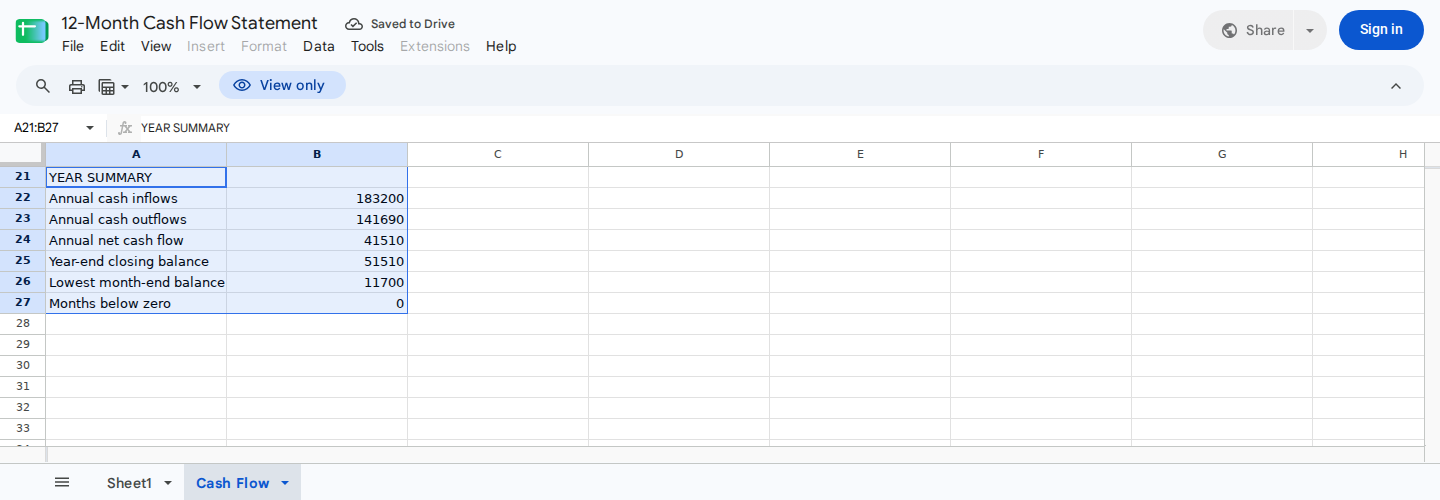
Compact annual summary for assessing liquidity and potential cash shortfalls.
| Cell | Output |
|---|---|
B22 | Total annual cash inflows |
B23 | Total annual cash outflows |
B24 | Annual net cash flow |
B25 | Year-end cash balance |
B26 | Lowest month-end cash balance |
B27 | Number of months with negative cash |
The illustrative baseline contains these monthly results:
| Month | Inflows | Outflows | Net cash flow | Closing cash |
|---|---|---|---|---|
| Jan | 12,500 | 10,800 | 1,700 | 11,700 |
| Feb | 13,100 | 10,920 | 2,180 | 13,880 |
| Mar | 13,400 | 11,380 | 2,020 | 15,900 |
| Apr | 14,200 | 11,310 | 2,890 | 18,790 |
| May | 14,500 | 11,630 | 2,870 | 21,660 |
| Jun | 15,300 | 11,600 | 3,700 | 25,360 |
| Jul | 15,600 | 11,970 | 3,630 | 28,990 |
| Aug | 15,900 | 11,910 | 3,990 | 32,980 |
| Sep | 16,000 | 11,940 | 4,060 | 37,040 |
| Oct | 16,900 | 12,530 | 4,370 | 41,410 |
| Nov | 17,100 | 12,420 | 4,680 | 46,090 |
| Dec | 18,700 | 13,280 | 5,420 | 51,510 |
The recorded baseline produces:
| Cell | Expected result |
|---|---|
B22 | 183,200 |
B23 | 141,690 |
B24 | 41,510 |
B25 | 51,510 |
B26 | 11,700 |
B27 | 0 |
Two reconciliations confirm the annual result:
- 183,200 - 141,690 = 41,510 annual net cash flow.
- 10,000 starting cash + 41,510 annual net cash flow = 51,510 year-end cash.
Review B19:M19 alongside B26:B27. A negative closing balance indicates a projected shortfall under the assumptions entered.
If you find one, examine collection timing, permitted payment timing, discretionary spending, and credible funding options. Don’t rely only on the summary count.
For a longer forecast horizon, see Forecast Cash Runway in Excel or Google Sheets.
Customize categories safely
You can rename an existing label in column A without changing the row structure. For example, replace “Other cash income” with another receipt category relevant to your business.
Adding or deleting rows requires an independent formula review because the supplied evidence doesn’t establish automatic expansion. If you change the structure:
- Work in a separate copy.
- Check each affected monthly total.
- Repeat the January reconciliation.
- Confirm that annual net cash flow equals annual inflows minus annual outflows.
- Confirm that year-end cash equals opening cash plus annual net cash flow.
Finally, verify that the schedule still covers exactly January through December for the year in B2.
Test a changed assumption
Change one input, then confirm that its effect rolls forward correctly.
Starting from the untouched baseline, increase June customer receipts in G7 from 14,500 to 19,500. Recorded execution produced:
G18: 8,700 June net cash flowG19: 30,360 June closing cashM19: 56,510 December closing cashB24: 46,510 annual net cash flowB25: 56,510 year-end cash
Because the receipt increased by 5,000 and no other input changed, June and every later closing balance should increase by 5,000. Annual outflows should remain 141,690.
In a separate recorded check, beginning cash and every January input were set to zero. January inflows, outflows, net cash flow, and closing cash all returned zero without formula errors. This result doesn’t establish how blanks or text inputs behave.
Check the workbook with ModelMonkey
ModelMonkey can inspect spreadsheet context and help with formulas, analysis, organization, formatting, and spreadsheet changes in Google Sheets and Excel. When the workflow presents a preview, review the proposed changes before proceeding.
For this template, use this range-specific request:
Check
Cash Flow!B9:M9,B17:M19, andB22:B27against the input ranges. Recalculate the January control and flag negative values inB19:M19.
Compare the response with the January and annual reconciliations above. Spreadsheet assistance doesn’t guarantee that every formula, forecast assumption, or proposed change is correct.
Wrapping Up
The template provides 12 monthly columns for receipts and payments, rolling closing cash balances, and an annual liquidity summary. Replace only the input cells, preserve the formula ranges, and verify the January and annual controls before using the forecast for cash-planning decisions.
Frequently Asked Questions
Should cash outflows be entered as negative numbers?
No. Enter payment assumptions in Cash Flow!B12:M16 as positive amounts. The workbook subtracts them when calculating net cash flow.
What should I enter when a category has no activity?
Enter 0. The recorded zero-activity case produced a zero January closing balance without formula errors. Blank and text-input behavior wasn’t verified.
Can I enter a separate opening balance for each month?
No. Enter starting cash once in Cash Flow!B4. Each subsequent closing balance rolls forward from the preceding month.
Can I add more receipt or payment categories?
Yes, but adding rows may require changes to the monthly totals and annual summary formulas. Make the change in a copy and repeat the January and annual reconciliations.
Has the download been tested in Microsoft Excel?
Independent Excel execution evidence wasn’t supplied. After opening the .xlsx file, verify that B9, B17, B18, and B19 match the January control before relying on later results.
Does zero closing cash count as a negative month?
No. In the recorded zero-activity case, January closing cash and the negative-month count were both zero. Review the monthly balances directly whenever projected liquidity approaches zero.
Does this replace an accounting statement of cash flows?
No. This is a monthly cash forecast. It doesn’t classify historical cash flows under an accounting standard or replace the income statement, balance sheet, bank reconciliation, or accounting records.
What does a negative closing balance mean?
It means forecast payments exceed the cash available by that month under the assumptions entered. It signals a projected funding gap, not a prescribed financing or spending decision.