
The supplied workbook is a manual tracker with 12 prepared rows. Use it to understand the fields, calculations, and review process:
Recorded Google Sheets execution evidence covers the manual workbook. The workbook wasn’t tested separately in desktop Excel, and no measured 25,000-row Power Query refresh was supplied. The design below therefore includes a deterministic acceptance test and a method for recording refresh time in the environment where the tracker will run.
What a purchase order tracking spreadsheet should contain
A PO log needs these fields:
| Field | Purpose |
|---|---|
| PO number | Identifies the purchase order |
| Line number | Distinguishes items within a multi-line PO |
| Supplier and item | Shows what was ordered and from whom |
| Owner | Assigns follow-up responsibility |
| Order and expected-delivery dates | Supports schedule checks |
| Status | Draft, Sent, Partially Received, Received, or Cancelled |
| Ordered and received quantities | Calculates remaining quantity by line |
| Unit of measure | Keeps cases, kilograms, and individual items separate |
| Unit price, charges, and tax | Calculates committed value |
| Currency | Separates records from the reporting currency |
| Invoiced and paid amounts | Calculates unpaid invoices |
| Next action and due date | Supports follow-up |
| Source file and source row | Traces imported data to its origin |
| Separate exception flags | Identifies every applicable issue |
Use the normalized PO number and normalized line number as the record key. Repeated PO numbers are valid when their line numbers differ. Investigate any repeated PO-and-line pair.
Start with the manual purchase order tracking workbook
The PO Tracker tab offers a compact version of the process.
For first use:
- Set
B2to the review date. - Set
D2to the single reporting currency. - Set
F2to the permitted delivery grace period in calendar days. - Format
B2,E15:F26, andP15:P26asyyyy-mm-dd. - Replace the synthetic inputs in
A15:P24. - Preserve
Q15:T26, which contains the prepared calculations.
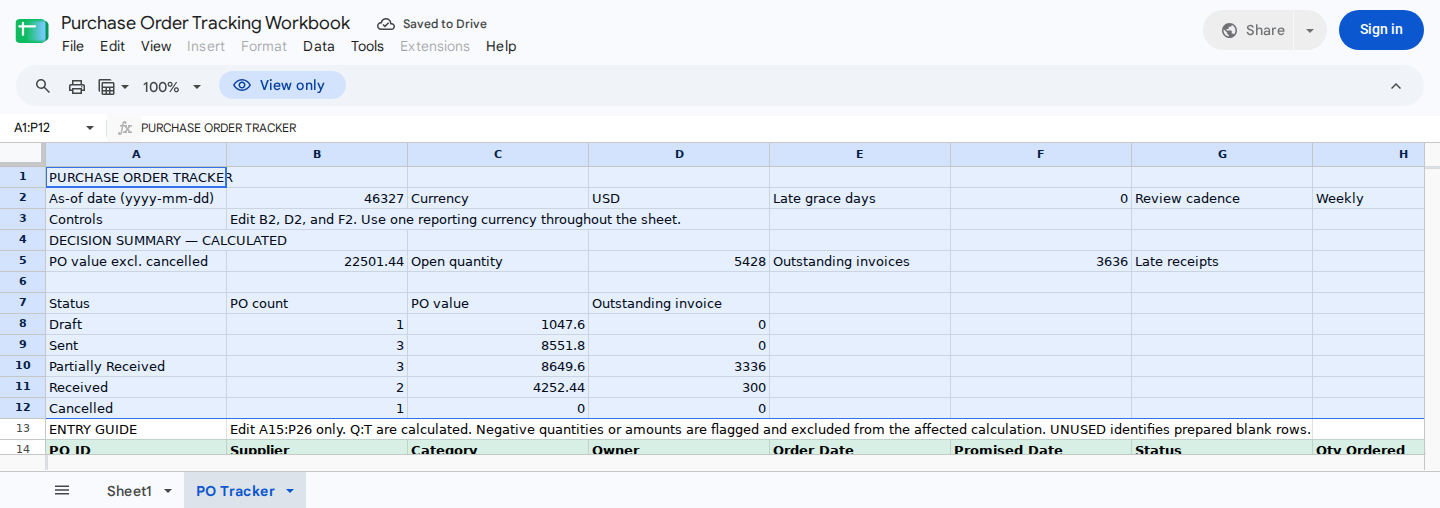
Weekly review area: update the as-of date and use the calculated totals and status breakdown to assess the current purchasing workload.
Manual workbook columns
The supported input range is A15:P26, with one purchase order per row.
| Column | Field | Entry rule |
|---|---|---|
| A | PO number | Unique internal identifier in the manual version |
| B | Supplier | Supplier name |
| C | Item | Item or order description |
| D | Owner | Person responsible for follow-up |
| E | Order date | Native spreadsheet date |
| F | Expected delivery | Native spreadsheet date |
| G | Status | Draft, Sent, Partially Received, Received, or Cancelled |
| H | Ordered quantity | Nonnegative number |
| I | Unit price | Nonnegative number |
| J | Charges | Shipping or other nonnegative charges |
| K | Tax | Nonnegative amount |
| L | Received quantity | Cumulative quantity received |
| M | Invoices | Cumulative supplier invoices recorded |
| N | Payments | Cumulative payments recorded |
| O | Next action | Current follow-up action |
| P | Action due date | Due date for the next action |
| Q | Committed PO value | Calculated |
| R | Remaining quantity | Calculated |
| S | Unpaid invoiced amount | Calculated |
| T | Primary exception | Calculated |
Recording an invoice in M doesn’t count it as paid. Enter cumulative payments separately in N.
The manual layout works only when each PO can be represented safely by one row. If a PO contains several items, prices, units, or expected dates, use the line-level Power Query design later in this article.
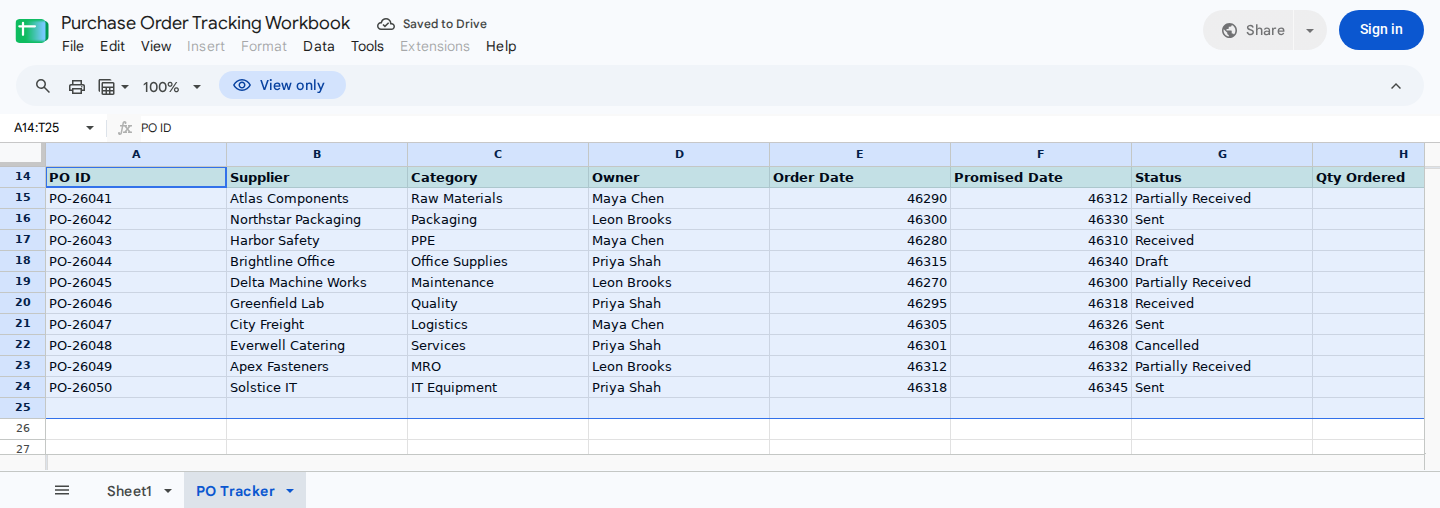
Order log showing late receipts, overdue actions, invoice variances, excess receipts, overpayments, cancellations, and a prepared row for the next order.
Calculate balances in the manual purchase order tracker
The downloaded workbook already contains these calculations. If you’re rebuilding the calculation area, enter each formula in row 15 and fill it through row 26.
Some regional Excel settings require semicolons instead of commas.
Committed PO value
Enter in Q15:
=IF(COUNTA(A15:P15)=0,0,IF(OR(EXACT(G15,"Cancelled"),NOT(ISNUMBER(H15)),NOT(ISNUMBER(I15)),NOT(ISNUMBER(J15)),NOT(ISNUMBER(K15)),H15<0,I15<0,J15<0,K15<0),0,H15*I15+J15+K15))
For a valid, non-cancelled row, the calculation is:
ordered quantity × unit price + charges + tax
Remaining quantity
Enter in R15:
=IF(COUNTA(A15:P15)=0,0,IF(OR(EXACT(G15,"Cancelled"),NOT(ISNUMBER(H15)),NOT(ISNUMBER(L15)),H15<0,L15<0),0,MAX(H15-L15,0)))
An over-receipt produces zero remaining quantity and is flagged separately.
Unpaid invoiced amount
Enter in S15:
=IF(COUNTA(A15:P15)=0,0,IF(OR(EXACT(G15,"Cancelled"),NOT(ISNUMBER(M15)),NOT(ISNUMBER(N15)),M15<0,N15<0),0,MAX(M15-N15,0)))
Microsoft documents the underlying Excel IF function syntax.
Primary exception
Enter in T15:
=IF(COUNTA(A15:P15)=0,"UNUSED",IF(OR(NOT(ISNUMBER($B$2)),NOT(ISNUMBER($F$2)),$F$2<0,NOT(OR(EXACT(G15,"Draft"),EXACT(G15,"Sent"),EXACT(G15,"Partially Received"),EXACT(G15,"Received"),EXACT(G15,"Cancelled"))),NOT(ISNUMBER(E15)),NOT(ISNUMBER(F15)),NOT(ISNUMBER(H15)),NOT(ISNUMBER(I15)),NOT(ISNUMBER(J15)),NOT(ISNUMBER(K15)),NOT(ISNUMBER(L15)),NOT(ISNUMBER(M15)),NOT(ISNUMBER(N15)),AND(O15<>"",NOT(ISNUMBER(P15))),H15<0,I15<0,J15<0,K15<0,L15<0,M15<0,N15<0),"INVALID INPUT",IF(EXACT(G15,"Cancelled"),"Cancelled",IF(L15>H15,"OVER-RECEIVED",IF(N15>M15,"OVERPAID",IF(M15>Q15,"INVOICE > PO",IF(AND(R15>0,F15+$F$2<$B$2),"LATE RECEIPT",IF(AND(NOT(EXACT(G15,"Received")),NOT(EXACT(G15,"Cancelled")),O15<>"",P15<$B$2),"ACTION OVERDUE",IF(AND(R15=0,OR(EXACT(G15,"Sent"),EXACT(G15,"Partially Received"))),"UPDATE STATUS","OK")))))))))
Column T returns only the first applicable result:
INVALID INPUT
Cancelled
OVER-RECEIVED
OVERPAID
INVOICE > PO
LATE RECEIPT
ACTION OVERDUE
UPDATE STATUS
OK
As a result, an invoice variance can hide a late receipt or overdue action. Counts based on T represent the displayed primary exceptions, not every issue affecting the row.
The manual formula also has several validation limits. It doesn’t detect:
- Fractional or out-of-range values in
B2,E15,F15, orP15. - A fractional grace period in
F2. - A due date in P when the corresponding action in O is blank.
Those pasted values can return OK or produce misleading late and overdue results. The validation rules later in this article reduce manual entry mistakes, but some paste and import operations can bypass validation. For recurring imports, use the Power Query checks. You should also inspect pasted records in the manual tracker.
Build the manual portfolio summary
Use these formulas in the summary area:
| Cell | Definition | Formula |
|---|---|---|
| B5 | Committed value | =SUM(Q15:Q26) |
| D5 | Remaining quantity | =SUM(R15:R26) |
| F5 | Unpaid invoiced amount | =SUM(S15:S26) |
| H5 | Displayed late receipts | =COUNTIF(T15:T26,"LATE RECEIPT") |
| J5 | Displayed overdue actions | =COUNTIF(T15:T26,"ACTION OVERDUE") |
| N5 | Used input rows | =COUNTIF(T15:T26,"<>UNUSED") |
| P5 | Displayed status-update exceptions | =COUNTIF(T15:T26,"UPDATE STATUS") |
Enter in L5:
=COUNTIF(T15:T26,"INVALID INPUT")+COUNTIF(T15:T26,"OVER-RECEIVED")+COUNTIF(T15:T26,"OVERPAID")+COUNTIF(T15:T26,"INVOICE > PO")+COUNTIF(T15:T26,"LATE RECEIPT")+COUNTIF(T15:T26,"ACTION OVERDUE")+COUNTIF(T15:T26,"UPDATE STATUS")
Use this exact status-row mapping:
A8  = Draft
A9  = Sent
A10 = Partially Received
A11 = Received
A12 = Cancelled
Enter these formulas in row 8 and fill them through row 12:
B8: =SUMPRODUCT(--EXACT($G$15:$G$26,$A8))
C8: =SUMPRODUCT(--EXACT($G$15:$G$26,$A8),$Q$15:$Q$26)
D8: =SUMPRODUCT(--EXACT($G$15:$G$26,$A8),$S$15:$S$26)
For the synthetic portfolio reviewed as of November 1, 2026, recorded Google Sheets execution returned:
B5 = 22501.44D5 = 5428F5 = 3636H5 = 3J5 = 1L5 = 7N5 = 10P5 = 0
The public readback of PO Tracker!A1:P12 displays this status summary:
| Status row | PO count | PO value | Outstanding invoice |
|---|---|---|---|
A8 Draft | 1 | 1047.60 | 0 |
A9 Sent | 3 | 8551.80 | 0 |
A10 Partially Received | 3 | 8649.60 | 3336 |
A11 Received | 2 | 4252.44 | 300 |
A12 Cancelled | 1 | 0 | 0 |
The CSV readback contains displayed values; it isn’t a new formula recalculation. Check the calculated cells after opening the downloaded file in your version of Excel.
Add and verify one manual purchase order
Begin with an unchanged copy. Set B2 to 2026-11-01 and F2 to 0, then enter this order in row 25:
| Cell | Value |
|---|---|
| A25 | PO-26051 |
| B25 | Orion Chemicals |
| C25 | Cleaning Supplies |
| D25 | Maya Chen |
| E25 | 2026-11-01 |
| F25 | 2026-11-24 |
| G25 | Sent |
| H25 | 24 |
| I25 | 45 |
| J25 | 60 |
| K25 | 91.20 |
| L25 | 0 |
| M25 | 0 |
| N25 | 0 |
| O25 | Obtain supplier acknowledgement |
| P25 | 2026-11-03 |
The committed value is:
24 × 45 + 60 + 91.20 = 1,231.20
Check these cells:
Q25 = 1231.20R25 = 24S25 = 0T25 = OKB5 = 23732.64D5 = 5452N5 = 11B9 = 4C9 = 9783.00D9 = 0
Row 26 remains unused, with Q26:S26 displaying 0 and T26 displaying UNUSED. These results are covered by the recorded Google Sheets execution evidence.
Scale purchase order tracking in Excel with Power Query
For recurring CSV imports, load the records into a separate PO Lines sheet as a dynamic Excel Table. Microsoft documents how to combine files with Power Query and create and format Excel Tables.
Define the line-level CSV schema
Every source CSV must use these headers:
PO_Number
Line_Number
Supplier
Item
Owner
Order_Date
Expected_Delivery
Status
Ordered_Qty
Unit_Price
Charges
Tax
Received_Qty
Invoiced_Amount
Paid_Amount
Currency
UOM
Next_Action
Action_Due_Date
Each row represents one PO line. The amount fields must also be line-level:
ChargesandTaxmust contain the amounts allocated to that line.Invoiced_AmountandPaid_Amountmust contain the cumulative amounts assigned to that line.- If the source system supplies only order-level amounts, allocate them across the lines using a documented rule before import.
- Never repeat the full order-level charge, tax, invoice, or payment on every line. Doing so overstates totals and makes line-level variance checks unreliable.
A multi-line PO repeats PO_Number but uses a different Line_Number for each item.
Create the Power Query controls
Assign these Excel names:
| Cell | Name | Valid value |
|---|---|---|
PO Tracker!B2 | ReviewDate | Whole-day date within the accepted date range |
PO Tracker!D2 | ReportingCurrency | Nonblank currency code |
PO Tracker!F2 | GraceDays | Nonnegative whole number |
Next, create a worksheet named PQ Controls and add:
| Cell | Name | Purpose |
|---|---|---|
PQ Controls!B2 | POFolder | Full path to the source CSV folder |
PQ Controls!B3 | MinValidDate | Earliest accepted whole-day date |
PQ Controls!B4 | MaxValidDate | Latest accepted whole-day date |
Create a one-column Excel Table named tblAllowedUOM with the header UOM. Enter each permitted unit code, including EA for the test fixture below.
The query must stop when a control is missing, a control date contains a time or fractional serial, ReviewDate falls outside the accepted date range, the boundaries are reversed, the grace period isn’t a whole nonnegative number, or the unit table is empty. The late-delivery calculation also catches a grace-period addition that would exceed Power Query’s supported date range. It returns an explicit error instead of silently producing a result.
Create the staging query
Choose Data > Get Data > From Other Sources > Blank Query, open Advanced Editor, name the query PO_Staging, and enter:
let
GetNamedValue = (name as text) as any =>
try Excel.CurrentWorkbook(){[Name = name]}[Content]{0}[Column1]
otherwise null,
ToWholeControlDate = (value as any, label as text) as date =>
let
Parsed = try Date.From(value) otherwise null,
IsWhole =
if value = null then
false
else if Value.Is(value, type date) then
true
else if Value.Is(value, type datetime) then
Time.From(value) = #time(0, 0, 0)
else if Value.Is(value, type datetimezone) then
Time.From(DateTimeZone.RemoveZone(value)) = #time(0, 0, 0)
else if Value.Is(value, type number) then
Number.RoundDown(Number.From(value)) = Number.From(value)
else
false
in
if Parsed = null or not IsWhole then
error Error.Record(
"Invalid " & label,
label & " must be a whole-day Excel date without a time component.",
value
)
else
Parsed,
MinDate = ToWholeControlDate(
GetNamedValue("MinValidDate"),
"MinValidDate"
),
MaxDateCandidate = ToWholeControlDate(
GetNamedValue("MaxValidDate"),
"MaxValidDate"
),
MaxDate =
if MaxDateCandidate < MinDate then
error Error.Record(
"Invalid date boundaries",
"MaxValidDate must be on or after MinValidDate.",
MaxDateCandidate
)
else
MaxDateCandidate,
ReviewDateCandidate = ToWholeControlDate(
GetNamedValue("ReviewDate"),
"ReviewDate"
),
ReviewDate =
if ReviewDateCandidate < MinDate
or ReviewDateCandidate > MaxDate then
error Error.Record(
"ReviewDate outside accepted range",
"ReviewDate must fall between MinValidDate and MaxValidDate.",
ReviewDateCandidate
)
else
ReviewDateCandidate,
ReportingCurrencyText =
let
Raw = GetNamedValue("ReportingCurrency")
in
if Raw = null then
""
else
Text.Upper(Text.Trim(Text.From(Raw))),
ReportingCurrency =
if ReportingCurrencyText = "" then
error Error.Record(
"Invalid ReportingCurrency",
"ReportingCurrency must contain a nonblank currency code.",
null
)
else
ReportingCurrencyText,
GraceRaw = GetNamedValue("GraceDays"),
GraceParsed = try Number.From(GraceRaw) otherwise null,
GraceDays =
if GraceParsed = null
or GraceParsed < 0
or Number.RoundDown(GraceParsed) <> GraceParsed then
error Error.Record(
"Invalid GraceDays",
"GraceDays must be a nonnegative whole number.",
GraceRaw
)
else
Int64.From(GraceParsed),
FolderRaw = GetNamedValue("POFolder"),
FolderText =
if FolderRaw = null then "" else Text.Trim(Text.From(FolderRaw)),
FolderPath =
if FolderText = "" then
error Error.Record(
"Invalid POFolder",
"POFolder must contain a folder path.",
FolderRaw
)
else
FolderText,
AllowedUOMTable =
try Excel.CurrentWorkbook(){[Name = "tblAllowedUOM"]}[Content]
otherwise
error Error.Record(
"Missing tblAllowedUOM",
"Create an Excel Table named tblAllowedUOM with a UOM column.",
null
),
AllowedUOMValues =
if not Table.HasColumns(AllowedUOMTable, "UOM") then
error Error.Record(
"Invalid tblAllowedUOM",
"tblAllowedUOM must contain a column named UOM.",
Table.ColumnNames(AllowedUOMTable)
)
else
List.Distinct(
List.Select(
List.Transform(
Table.Column(AllowedUOMTable, "UOM"),
each
if _ = null then
""
else
Text.Upper(Text.Trim(Text.From(_)))
),
each _ <> ""
)
),
AllowedUOMs =
if List.IsEmpty(AllowedUOMValues) then
error Error.Record(
"Invalid tblAllowedUOM",
"Enter at least one permitted unit in tblAllowedUOM.",
null
)
else
AllowedUOMValues,
ValidationToken =
Date.ToText(ReviewDate, "yyyy-MM-dd")
& "|"
& ReportingCurrency
& "|"
& Number.ToText(GraceDays, "0", "en-US")
& "|"
& Date.ToText(MinDate, "yyyy-MM-dd")
& "|"
& Date.ToText(MaxDate, "yyyy-MM-dd")
& "|"
& FolderPath
& "|"
& Text.Combine(AllowedUOMs, ","),
ValidatedFolder =
if Text.Length(ValidationToken) >= 0 then
FolderPath
else
error "Control validation failed.",
RequiredColumns = {
"PO_Number", "Line_Number", "Supplier", "Item", "Owner",
"Order_Date", "Expected_Delivery", "Status", "Ordered_Qty",
"Unit_Price", "Charges", "Tax", "Received_Qty",
"Invoiced_Amount", "Paid_Amount", "Currency", "UOM",
"Next_Action", "Action_Due_Date"
},
ToNumber = (value as any) as nullable number =>
let
TextValue =
if value = null then "" else Text.Trim(Text.From(value))
in
if TextValue = "" then
null
else
try Number.FromText(TextValue, "en-US") otherwise null,
ToDate = (value as any) as nullable date =>
let
TextValue =
if value = null then "" else Text.Trim(Text.From(value)),
AsNumber =
try Number.FromText(TextValue, "en-US") otherwise null
in
if TextValue = "" then
null
else if AsNumber <> null then
if Number.RoundDown(AsNumber) <> AsNumber then
null
else
try Date.From(AsNumber) otherwise null
else
try Date.FromText(
TextValue,
[Culture = "en-US"]
) otherwise null,
IsBadNumber = (value as nullable number) as logical =>
value = null or value < 0,
IsDateInRange = (value as nullable date) as logical =>
value <> null and value >= MinDate and value <= MaxDate,
FilesAttempt = try Folder.Files(ValidatedFolder),
Files =
if FilesAttempt[HasError] then
error Error.Record(
"Cannot read POFolder",
"Power Query could not read the folder in POFolder.",
FilesAttempt[Error]
)
else
FilesAttempt[Value],
CsvFiles = Table.SelectRows(
Files,
each Text.Lower([Extension]) = ".csv"
and not Text.StartsWith([Name], "~$")
),
ParseFile = (content as binary, sourceLocation as text) as table =>
let
Csv = Csv.Document(
content,
[Delimiter = ",", Encoding = 65001, QuoteStyle = QuoteStyle.Csv]
),
Headers = Table.PromoteHeaders(
Csv,
[PromoteAllScalars = true]
),
MissingHeaders = List.Difference(
RequiredColumns,
Table.ColumnNames(Headers)
),
WithRow = Table.AddIndexColumn(
Headers,
"SourceRow",
2,
1,
Int64.Type
),
WithFile = Table.AddColumn(
WithRow,
"SourceFile",
each sourceLocation,
type text
),
WithHeaderList = Table.AddColumn(
WithFile,
"MissingRequiredHeaders",
each Text.Combine(MissingHeaders, ", "),
type text
),
WithHeaderFlag = Table.AddColumn(
WithHeaderList,
"FlagMissingRequiredHeader",
each not List.IsEmpty(MissingHeaders),
type logical
)
in
WithHeaderFlag,
ImportedTables = List.Transform(
Table.ToRecords(CsvFiles),
each ParseFile(
_[Content],
_[Folder Path] & _[Name]
)
),
EmptyTable = #table(
RequiredColumns
& {
"SourceFile",
"SourceRow",
"MissingRequiredHeaders",
"FlagMissingRequiredHeader"
},
{}
),
Combined =
if List.IsEmpty(ImportedTables) then
EmptyTable
else
Table.Combine(ImportedTables),
Selected = Table.SelectColumns(
Combined,
RequiredColumns
& {
"SourceFile",
"SourceRow",
"MissingRequiredHeaders",
"FlagMissingRequiredHeader"
},
MissingField.UseNull
),
WithSupplierRaw = Table.AddColumn(
Selected,
"Supplier_Raw",
each if [Supplier] = null then "" else Text.From([Supplier]),
type text
),
Cleaned = Table.TransformColumns(
WithSupplierRaw,
List.Transform(
RequiredColumns,
(columnName) => {
columnName,
each
if _ = null then
""
else
Text.Trim(Text.Clean(Text.From(_))),
type text
}
)
),
WithPONumber = Table.AddColumn(
Cleaned,
"PONumberNormalized",
each Text.Upper([PO_Number]),
type text
),
WithLineNumber = Table.AddColumn(
WithPONumber,
"LineNumberNormalized",
each Text.Upper([Line_Number]),
type text
),
WithCurrency = Table.AddColumn(
WithLineNumber,
"CurrencyNormalized",
each Text.Upper([Currency]),
type text
),
WithUOM = Table.AddColumn(
WithCurrency,
"UOMNormalized",
each Text.Upper([UOM]),
type text
),
WithStatus = Table.AddColumn(
WithUOM,
"StatusNormalized",
each
let StatusKey = Text.Upper([Status])
in
if StatusKey = "DRAFT" then "Draft"
else if StatusKey = "SENT" then "Sent"
else if StatusKey = "PARTIALLY RECEIVED"
then "Partially Received"
else if StatusKey = "RECEIVED" then "Received"
else if StatusKey = "CANCELLED" then "Cancelled"
else [Status],
type text
),
NumberMap = {
{"Ordered_Qty", "OrderedQty"},
{"Unit_Price", "UnitPrice"},
{"Charges", "ChargesValue"},
{"Tax", "TaxValue"},
{"Received_Qty", "ReceivedQty"},
{"Invoiced_Amount", "InvoicedAmount"},
{"Paid_Amount", "PaidAmount"}
},
ParsedNumbers = List.Accumulate(
NumberMap,
WithStatus,
(state, pair) =>
Table.AddColumn(
state,
pair{1},
each ToNumber(Record.Field(_, pair{0})),
type number
)
),
DateMap = {
{"Order_Date", "OrderDate"},
{"Expected_Delivery", "ExpectedDelivery"},
{"Action_Due_Date", "ActionDueDate"}
},
ParsedDates = List.Accumulate(
DateMap,
ParsedNumbers,
(state, pair) =>
Table.AddColumn(
state,
pair{1},
each ToDate(Record.Field(_, pair{0})),
type date
)
),
WithPOKey = Table.AddColumn(
ParsedDates,
"POKey",
each
Number.ToText(
Text.Length([PONumberNormalized]),
"0",
"en-US"
)
& ":"
& [PONumberNormalized]
& Number.ToText(
Text.Length([LineNumberNormalized]),
"0",
"en-US"
)
& ":"
& [LineNumberNormalized],
type text
),
KeyCounts = Table.Group(
WithPOKey,
{"PONumberNormalized", "LineNumberNormalized"},
{{"KeyCount", each Table.RowCount(_), Int64.Type}}
),
JoinedCounts = Table.NestedJoin(
WithPOKey,
{"PONumberNormalized", "LineNumberNormalized"},
KeyCounts,
{"PONumberNormalized", "LineNumberNormalized"},
"KeySummary",
JoinKind.LeftOuter
),
ExpandedCounts = Table.ExpandTableColumn(
JoinedCounts,
"KeySummary",
{"KeyCount"},
{"KeyCount"}
),
AddMissingKey = Table.AddColumn(
ExpandedCounts,
"FlagMissingKey",
each [PONumberNormalized] = ""
or [LineNumberNormalized] = "",
type logical
),
AddMissingSupplier = Table.AddColumn(
AddMissingKey,
"FlagMissingSupplier",
each [Supplier] = "",
type logical
),
AddMissingItem = Table.AddColumn(
AddMissingSupplier,
"FlagMissingItem",
each [Item] = "",
type logical
),
AddMissingOwner = Table.AddColumn(
AddMissingItem,
"FlagMissingOwner",
each [Owner] = "",
type logical
),
AddInvalidUOM = Table.AddColumn(
AddMissingOwner,
"FlagInvalidUOM",
each [UOMNormalized] = ""
or not List.Contains(AllowedUOMs, [UOMNormalized]),
type logical
),
AddDuplicate = Table.AddColumn(
AddInvalidUOM,
"FlagDuplicateLine",
each not [FlagMissingKey] and [KeyCount] > 1,
type logical
),
AddWhitespace = Table.AddColumn(
AddDuplicate,
"FlagSupplierWhitespace",
each [Supplier_Raw]
<> Text.Trim(Text.Clean([Supplier_Raw])),
type logical
),
AddOrderDateFlag = Table.AddColumn(
AddWhitespace,
"FlagInvalidOrderDate",
each not IsDateInRange([OrderDate]),
type logical
),
AddDeliveryDateFlag = Table.AddColumn(
AddOrderDateFlag,
"FlagInvalidExpectedDelivery",
each not IsDateInRange([ExpectedDelivery]),
type logical
),
AddActionPairFlag = Table.AddColumn(
AddDeliveryDateFlag,
"FlagIncompleteActionPair",
each
([Next_Action] = "" and [Action_Due_Date] <> "")
or ([Next_Action] <> "" and [Action_Due_Date] = ""),
type logical
),
AddActionDateFlag = Table.AddColumn(
AddActionPairFlag,
"FlagInvalidActionDate",
each [Action_Due_Date] <> ""
and not IsDateInRange([ActionDueDate]),
type logical
),
AddQuantityFlag = Table.AddColumn(
AddActionDateFlag,
"FlagInvalidQuantity",
each IsBadNumber([OrderedQty])
or IsBadNumber([ReceivedQty]),
type logical
),
AddMoneyFlag = Table.AddColumn(
AddQuantityFlag,
"FlagInvalidMoney",
each IsBadNumber([UnitPrice])
or IsBadNumber([ChargesValue])
or IsBadNumber([TaxValue])
or IsBadNumber([InvoicedAmount])
or IsBadNumber([PaidAmount]),
type logical
),
ValidStatuses = {
"Draft",
"Sent",
"Partially Received",
"Received",
"Cancelled"
},
AddStatusFlag = Table.AddColumn(
AddMoneyFlag,
"FlagInvalidStatus",
each not List.Contains(
ValidStatuses,
[StatusNormalized]
),
type logical
),
AddCurrencyFlag = Table.AddColumn(
AddStatusFlag,
"FlagUnexpectedCurrency",
each [CurrencyNormalized] <> ReportingCurrency,
type logical
),
AddCommittedValue = Table.AddColumn(
AddCurrencyFlag,
"CommittedValue",
each
if [FlagUnexpectedCurrency] then
null
else if [StatusNormalized] = "Cancelled" then
0
else if [FlagInvalidStatus]
or IsBadNumber([OrderedQty])
or IsBadNumber([UnitPrice])
or IsBadNumber([ChargesValue])
or IsBadNumber([TaxValue]) then
null
else
[OrderedQty] * [UnitPrice]
+ [ChargesValue]
+ [TaxValue],
type nullable number
),
AddRemainingQuantity = Table.AddColumn(
AddCommittedValue,
"RemainingQuantity",
each
if [StatusNormalized] = "Cancelled" then
0
else if [FlagInvalidStatus]
or [FlagInvalidUOM]
or [FlagInvalidQuantity] then
null
else
List.Max({
[OrderedQty] - [ReceivedQty],
0
}),
type nullable number
),
AddUnpaidInvoice = Table.AddColumn(
AddRemainingQuantity,
"UnpaidInvoice",
each
if [FlagUnexpectedCurrency] then
null
else if [StatusNormalized] = "Cancelled" then
0
else if [FlagInvalidStatus]
or IsBadNumber([InvoicedAmount])
or IsBadNumber([PaidAmount]) then
null
else
List.Max({
[InvoicedAmount] - [PaidAmount],
0
}),
type nullable number
),
AddOverReceived = Table.AddColumn(
AddUnpaidInvoice,
"FlagOverReceived",
each
if [StatusNormalized] = "Cancelled"
or [FlagInvalidStatus]
or [FlagInvalidUOM]
or [FlagInvalidQuantity] then
false
else
[ReceivedQty] > [OrderedQty],
type logical
),
AddOverpaid = Table.AddColumn(
AddOverReceived,
"FlagOverpaid",
each
if [StatusNormalized] = "Cancelled"
or [FlagInvalidStatus]
or IsBadNumber([InvoicedAmount])
or IsBadNumber([PaidAmount]) then
false
else
[PaidAmount] > [InvoicedAmount],
type logical
),
AddInvoiceOverPO = Table.AddColumn(
AddOverpaid,
"FlagInvoiceOverPO",
each
if [StatusNormalized] = "Cancelled"
or [FlagInvalidStatus]
or [FlagUnexpectedCurrency]
or IsBadNumber([OrderedQty])
or IsBadNumber([UnitPrice])
or IsBadNumber([ChargesValue])
or IsBadNumber([TaxValue])
or IsBadNumber([InvoicedAmount]) then
false
else
[InvoicedAmount] > [CommittedValue],
type logical
),
AddLateReceipt = Table.AddColumn(
AddInvoiceOverPO,
"FlagLateReceipt",
each
if [StatusNormalized] = "Cancelled"
or [FlagInvalidStatus]
or [FlagInvalidUOM]
or [FlagInvalidQuantity]
or [FlagInvalidExpectedDelivery]
or [RemainingQuantity] = null
or [RemainingQuantity] <= 0 then
false
else
let
DeadlineAttempt =
try Date.AddDays(
[ExpectedDelivery],
GraceDays
)
in
if DeadlineAttempt[HasError] then
error Error.Record(
"Invalid delivery deadline",
"ExpectedDelivery plus GraceDays exceeds Power Query's supported date range.",
[
ExpectedDelivery = [ExpectedDelivery],
GraceDays = GraceDays,
SourceFile = [SourceFile],
SourceRow = [SourceRow]
]
)
else
DeadlineAttempt[Value] < ReviewDate,
type logical
),
AddActionOverdue = Table.AddColumn(
AddLateReceipt,
"FlagActionOverdue",
each
if [FlagInvalidStatus]
or List.Contains(
{"Received", "Cancelled"},
[StatusNormalized]
)
or [Next_Action] = ""
or [FlagIncompleteActionPair]
or [FlagInvalidActionDate] then
false
else
[ActionDueDate] < ReviewDate,
type logical
),
AddUpdateStatus = Table.AddColumn(
AddActionOverdue,
"FlagUpdateStatus",
each
if [FlagInvalidStatus]
or [FlagInvalidUOM]
or [FlagInvalidQuantity]
or [RemainingQuantity] = null then
false
else
[RemainingQuantity] = 0
and List.Contains(
{"Sent", "Partially Received"},
[StatusNormalized]
),
type logical
),
AddReportEligible = Table.AddColumn(
AddUpdateStatus,
"FlagReportEligible",
each
not List.AnyTrue({
[FlagMissingRequiredHeader],
[FlagMissingKey],
[FlagMissingSupplier],
[FlagMissingItem],
[FlagMissingOwner],
[FlagInvalidUOM],
[FlagDuplicateLine],
[FlagInvalidOrderDate],
[FlagInvalidExpectedDelivery],
[FlagIncompleteActionPair],
[FlagInvalidActionDate],
[FlagInvalidQuantity],
[FlagInvalidMoney],
[FlagInvalidStatus],
[FlagUnexpectedCurrency]
}),
type logical
),
AddExceptionCount = Table.AddColumn(
AddReportEligible,
"ExceptionCount",
each
List.Count(
List.Select(
{
[FlagMissingRequiredHeader],
[FlagMissingKey],
[FlagMissingSupplier],
[FlagMissingItem],
[FlagMissingOwner],
[FlagInvalidUOM],
[FlagDuplicateLine],
[FlagSupplierWhitespace],
[FlagInvalidOrderDate],
[FlagInvalidExpectedDelivery],
[FlagIncompleteActionPair],
[FlagInvalidActionDate],
[FlagInvalidQuantity],
[FlagInvalidMoney],
[FlagInvalidStatus],
[FlagUnexpectedCurrency],
[FlagOverReceived],
[FlagOverpaid],
[FlagInvoiceOverPO],
[FlagLateReceipt],
[FlagActionOverdue],
[FlagUpdateStatus]
},
each _ = true
)
),
Int64.Type
)
in
AddExceptionCount
The query keeps duplicate records instead of deleting them. Every occurrence receives FlagDuplicateLine = TRUE, allowing the analyst to compare SourceFile and SourceRow before correcting the source.
Statuses are normalized regardless of capitalization. For example, sent, SENT, and Sent all become Sent. This behavior differs from the manual formulas, where EXACT makes status matching case-sensitive.
The date parser accepts whole-number Excel serials and dates interpreted with the en-US culture. If suppliers use different date conventions, create source-specific transformations instead of asking one parser to guess.
Load the dynamic Excel Table
Load PO_Staging to a worksheet named PO Lines, then rename the resulting Excel Table tblPOTracking.
Build a PivotTable from that table:
- Rows:
StatusNormalized - Values: count of
POKey - Values: sum of
CommittedValue - Values: sum of
UnpaidInvoice - Filter:
FlagReportEligible - Optional filters: owner, supplier, unit, and individual exception flags
Set FlagReportEligible to TRUE for reporting totals. Missing keys, duplicates, invalid types, invalid statuses, invalid units, incomplete action/date pairs, and unexpected currencies are excluded until corrected.
Valid operational exceptions remain eligible. A late receipt requires attention, but it doesn’t make an otherwise valid record unusable.
Don’t sum RemainingQuantity across different units. Put UOMNormalized in the PivotTable rows or filters.
Give every exception its own flag
A PO line can show several conditions at once:
FlagDuplicateLine = TRUE
FlagInvalidExpectedDelivery = TRUE
FlagUnexpectedCurrency = TRUE
FlagIncompleteActionPair = TRUE
Create a second blank query named PO_QA_Profile:
let
    Source = PO_Staging,

    CountTrue = (columnName as text) as number =>
        List.Count(
            List.Select(
                Table.Column(Source, columnName),
                each _ = true
            )
        ),

    CountFalse = (columnName as text) as number =>
        List.Count(
            List.Select(
                Table.Column(Source, columnName),
                each _ = false
            )
        ),

    Profile = #table(
        {"Metric", "Count"},
        {
            {"Imported rows", Table.RowCount(Source)},
            {"Rows excluded from reporting",
                CountFalse("FlagReportEligible")},
            {"Rows affected by missing required headers",
                CountTrue("FlagMissingRequiredHeader")},
            {"Missing keys", CountTrue("FlagMissingKey")},
            {"Missing suppliers", CountTrue("FlagMissingSupplier")},
            {"Missing items", CountTrue("FlagMissingItem")},
            {"Missing owners", CountTrue("FlagMissingOwner")},
            {"Invalid units", CountTrue("FlagInvalidUOM")},
            {"Duplicate PO lines", CountTrue("FlagDuplicateLine")},
            {"Supplier whitespace corrected",
                CountTrue("FlagSupplierWhitespace")},
            {"Invalid order dates", CountTrue("FlagInvalidOrderDate")},
            {"Invalid delivery dates",
                CountTrue("FlagInvalidExpectedDelivery")},
            {"Incomplete action/date pairs",
                CountTrue("FlagIncompleteActionPair")},
            {"Invalid action dates", CountTrue("FlagInvalidActionDate")},
            {"Invalid quantities", CountTrue("FlagInvalidQuantity")},
            {"Invalid money values", CountTrue("FlagInvalidMoney")},
            {"Invalid statuses", CountTrue("FlagInvalidStatus")},
            {"Unexpected currencies",
                CountTrue("FlagUnexpectedCurrency")},
            {"Over-receipts", CountTrue("FlagOverReceived")},
            {"Overpayments", CountTrue("FlagOverpaid")},
            {"Invoices above PO value",
                CountTrue("FlagInvoiceOverPO")},
            {"Late receipts", CountTrue("FlagLateReceipt")},
            {"Overdue actions", CountTrue("FlagActionOverdue")},
            {"Status updates required",
                CountTrue("FlagUpdateStatus")}
        }
    )
in
    Profile
These counts overlap. Reconcile the population with:
report-eligible rows + rows excluded from reporting = imported rows
An invalid prerequisite won’t generate a misleading secondary flag. A blank ordered quantity, for example, produces FlagInvalidQuantity = TRUE, leaves the balance as null, and doesn’t also create a status-update flag.
Test the Excel tracker with 25,000 dirty rows
No executed 25,000-row refresh or measured refresh duration was supplied. Use this deterministic fixture to validate the logic and measure performance in your Excel environment.
Create a blank query named DirtyPOFixture:
let
    Rows = 25000,

    Fixture = Table.FromRecords(
        List.Transform(
            {1..Rows},
            (i) => [
                PO_Number =
                    if Number.Mod(i, 500) = 0 then
                        "PO-"
                            & Text.PadStart(
                                Text.From(i - 1),
                                5,
                                "0"
                            )
                    else
                        "PO-"
                            & Text.PadStart(
                                Text.From(i),
                                5,
                                "0"
                            ),

                Line_Number = "1",

                Supplier =
                    if Number.Mod(i, 3100) = 0 then
                        ""
                    else
                        "Supplier "
                            & Text.From(Number.Mod(i, 25) + 1)
                            & (
                                if Number.Mod(i, 625) = 0 then
                                    "   "
                                else
                                    ""
                            ),

                Item =
                    if Number.Mod(i, 3300) = 0 then
                        ""
                    else
                        "Item "
                            & Text.From(Number.Mod(i, 100) + 1),

                Owner =
                    if Number.Mod(i, 3600) = 0 then
                        ""
                    else
                        "Buyer "
                            & Text.From(Number.Mod(i, 10) + 1),

                Order_Date = "2026-01-01",

                Expected_Delivery =
                    if Number.Mod(i, 800) = 0 then
                        "not-a-date"
                    else
                        Date.ToText(
                            Date.AddDays(
                                #date(2026, 1, 1),
                                Number.Mod(i, 90)
                            ),
                            "yyyy-MM-dd"
                        ),

                Status =
                    if Number.Mod(i, 2000) = 0
                    then "Pending"
                    else "Sent",

                Ordered_Qty =
                    if Number.Mod(i, 1000) = 0 then
                        ""
                    else
                        Text.From(Number.Mod(i, 50) + 1),

                Unit_Price =
                    if Number.Mod(i, 1250) = 0
                    then ""
                    else "10.00",

                Charges = "0",
                Tax = "0",
                Received_Qty = "0",
                Invoiced_Amount = "0",
                Paid_Amount = "0",

                Currency =
                    if Number.Mod(i, 400) = 0
                    then "EUR"
                    else "USD",

                UOM =
                    if Number.Mod(i, 2800) = 0
                    then "UNKNOWN"
                    else "EA",

                Next_Action = "Confirm delivery date",
                Action_Due_Date = "2026-01-15"
            ]
        )
    )
in
    Fixture
Load the fixture to a temporary sheet and save that sheet as a UTF-8 CSV in an otherwise empty test folder. Folder.Files searches subfolders too, so the test folder and its subfolders should contain only that CSV.
Set the controls to:
ReviewDate = 2026-01-01
ReportingCurrency = USD
GraceDays = 0
MinValidDate = 2020-01-01
MaxValidDate = 2035-12-31
tblAllowedUOM contains EA
Refresh PO_Staging and PO_QA_Profile. The fixture’s modular rules produce these expected counts:
| Check | Expected count |
|---|---|
| Imported rows | 25,000 |
| Report-eligible rows | 24,830 |
| Rows excluded from reporting | 170 |
| Rows affected by missing required headers | 0 |
| Duplicate PO-line rows | 100 |
| Missing suppliers | 8 |
| Missing items | 7 |
| Missing owners | 6 |
| Invalid units | 8 |
| Supplier whitespace corrections | 40 |
| Invalid expected-delivery dates | 31 |
| Incomplete action/date pairs | 0 |
| Invalid action dates | 0 |
| Invalid quantities | 25 |
| Invalid money values | 20 |
| Invalid statuses | 12 |
| Unexpected currencies | 62 |
| Status-update flags caused by blank quantities | 0 |
| Invoice-over-PO flags caused by invalid pricing | 0 |
The reconciliation check is:
24,830 report-eligible rows + 170 excluded rows = 25,000 imported rows
The duplicate total is 100 because each 500th row repeats the preceding row’s PO-and-line pair, and both occurrences are flagged. Don’t add exception counts to estimate affected rows because one row can appear in several counts.
Unexpected-currency rows retain their source values for investigation. However, their monetary calculations return null, and the rows are excluded from reporting.
Record the refresh time
The supported result for this article is:
25,000-row refresh time: not measured from supplied execution evidence
Measure it locally:
- Record the Excel version, computer specification, and whether the CSV is stored locally or on a network drive.
- Close unrelated workbooks.
- Choose Data > Refresh All.
- Record the elapsed time until
tblPOTrackingandPO_QA_Profileboth finish. - Repeat under the same conditions.
- Save the measured results with the workbook.
This process produces a result for the computer and file location that will run the tracker.
Verify what happens when new rows arrive
Change the fixture’s Rows value from 25000 to 25100. Regenerate the CSV and replace the existing file. Don’t append a second full extract.
Rows 25,001 through 25,100 don’t cross any of the fixture’s exception thresholds. After refresh, the expected output is:
| Check | Expected result |
|---|---|
| Excel Table rows | 25,100 |
| Report-eligible rows | 24,930 |
| Rows excluded from reporting | 170 |
| Duplicate PO-line rows | 100 |
| Missing suppliers | 8 |
| Missing items | 7 |
| Missing owners | 6 |
| Invalid units | 8 |
| Supplier whitespace corrections | 40 |
| Invalid expected-delivery dates | 31 |
| Invalid quantities | 25 |
| Invalid money values | 20 |
| Invalid statuses | 12 |
| Unexpected currencies | 62 |
The refreshed population should reconcile as:
24,930 report-eligible rows + 170 excluded rows = 25,100 imported rows
Confirm these results locally because no supplied evidence establishes that this Power Query refresh was executed.
For real imports, determine whether each new file is an incremental batch or a full extract. Loading overlapping full extracts repeats existing PO lines, which the duplicate flag will identify.
Add data-entry controls for manual records
Microsoft’s Excel data-validation documentation explains list, number, and date controls.
Use list validation for G15:G26:
Draft,Sent,Partially Received,Received,Cancelled
Restrict H15:N26 to nonnegative numbers.
For F2, require a whole nonnegative grace period:
=AND(ISNUMBER(F2),F2>=0,F2=INT(F2))
After creating the MinValidDate and MaxValidDate names, validate B2 with:
=AND(ISNUMBER(B2),B2=INT(B2),B2>=MinValidDate,B2<=MaxValidDate)
Apply this rule to E15:F26, using E15 as the upper-left reference:
=AND(ISNUMBER(E15),E15=INT(E15),E15>=MinValidDate,E15<=MaxValidDate)
Apply this rule to P15:P26:
=OR(AND(O15="",P15=""),AND(O15<>"",ISNUMBER(P15),P15=INT(P15),P15>=MinValidDate,P15<=MaxValidDate))
That rule rejects either half of the action/date pair when values are entered through validated cells.
Some paste and import operations can bypass data validation. The manual T formula doesn’t detect all fractional dates, out-of-range dates, fractional grace periods, or orphaned due dates, so inspect pasted manual records. For recurring imports, use the Power Query range, type, and action-pair flags. For related cleanup methods, see Google Sheets data cleaning.
Run the weekly purchase order review
Follow this process for the manual and Power Query versions:
- Update the review date.
- Refresh the Power Query tables when importing files.
- Compare the imported row count with the source-file totals.
- Reconcile report-eligible and excluded rows to imported rows.
- Resolve missing headers and required fields.
- Correct missing or duplicate PO-line keys.
- Resolve invalid dates, quantities, amounts, statuses, currencies, units, and incomplete action/date pairs.
- Investigate over-receipts, overpayments, and invoices above committed value.
- Follow up on late receipts and overdue actions.
- Update fully received lines still marked Sent or Partially Received.
- Filter reporting totals to
FlagReportEligible = TRUE. - Review monetary totals only in the reporting currency and quantities separately by unit.
- Retain the source CSVs used for the refresh.
In the manual workbook, work through INVALID INPUT, OVER-RECEIVED, OVERPAID, INVOICE > PO, LATE RECEIPT, ACTION OVERDUE, and UPDATE STATUS. Once those issues are resolved, review B5:P5 and A7:D12.
When the manual input range is full, duplicate the sheet as a dated archive. Retain active orders, clear completed inputs only from A15:P26, and preserve Q15:T26.
Neither setup sends supplier notifications or synchronizes with a purchasing system. The tracker records the current state, but it doesn’t preserve every receipt, invoice, payment, and status-change event.
Use ModelMonkey to inspect purchase order exceptions
ModelMonkey can inspect spreadsheet context in Excel or Google Sheets and help read, search, analyze, organize, format, or change spreadsheet content. Check its output against the purchase orders, receipts, invoices, and payment records.
For the Power Query result, use:
Inspect
tblPOTracking. Count the TRUE values in every exception flag and reconcile imported rows to report-eligible and excluded rows. List duplicate normalized PO-and-line pairs withSourceFileandSourceRow. Group late receipts and overdue actions by owner. Include onlyFlagReportEligible = TRUErows in monetary totals, and keep remaining quantities separated byUOMNormalized. Propose corrections without changing imported business values until I review them.
When the workflow presents a preview, review the proposed changes before proceeding. Spreadsheet assistance doesn’t guarantee that every formula, conclusion, or edit is correct.
Download the Excel purchase order tracker or copy the Google Sheets version. Then ask ModelMonkey to inspect the prepared range or the Power Query output you create. See how to choose an AI spreadsheet generator for broader selection criteria.