
Copy this Google Sheets template or download the Excel file.
The Freelancer Quarterly Tax Tracker covers one tax year per sheet. It estimates a tax reserve, compares that estimate with reserve cash, and tracks quarterly payment gaps. It doesn’t calculate your final return, verify deductions, file forms, or submit payments.
What the tax tracker calculates
The Tax Tracker sheet contains:
- Editable assumptions in
B3:B8 - A calculated combined reserve rate in
B9 - Opening balances in
B10:B11 - Tax and reserve summaries in
E3:E11 - A quarterly payment plan in
G3:L7 - Transaction inputs in
A16:I30 - Calculated transaction values in
J16:L30
Its summary reports gross income received, deductible expenses paid, estimated net profit, estimated reserve need, recorded tax payments, remaining estimated liability, reserve cash, funding gap, and reserve coverage.
A coverage ratio of 1.00 means reserve cash equals the remaining estimated liability. A result above 1.00 means recorded reserve cash exceeds the current estimate. However, it doesn’t prove that the assumptions will match the eventual tax bill.
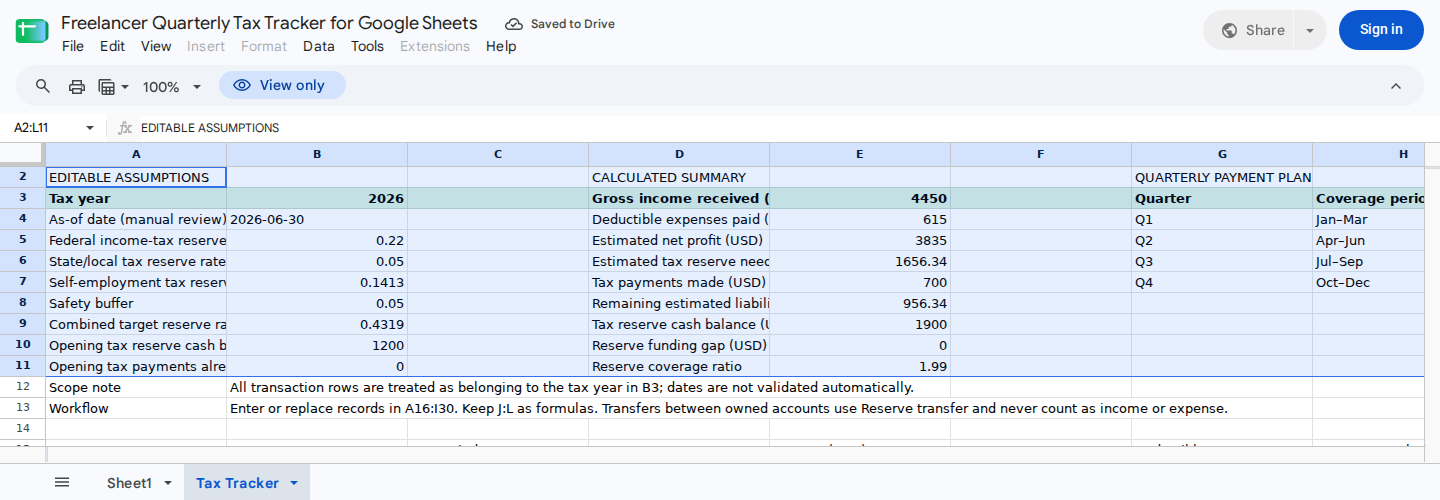
The control area links the editable reserve assumptions and opening balances to the current estimate, funding gap, coverage ratio, and quarterly payment gaps.
Configure the tax year and reserve assumptions
After copying the template, update these cells:
| Cell | Entry |
|---|---|
Tax Tracker!B3 | Tax year |
Tax Tracker!B4 | Manual review date |
Tax Tracker!B5 | Federal income-tax reserve rate |
Tax Tracker!B6 | State and local reserve rate |
Tax Tracker!B7 | Self-employment tax reserve rate |
Tax Tracker!B8 | Safety buffer |
Tax Tracker!B10 | Opening cash in the dedicated tax-reserve account |
Tax Tracker!B11 | Tax payments made before the first logged transaction |
Don’t overwrite B9; it calculates the combined target reserve rate.
The example workbook begins with:
- Tax year: 2026
- Review date: June 30, 2026
- Federal reserve rate: 22%
- State and local reserve rate: 5%
- Self-employment tax reserve rate: 14.13%
- Safety buffer: 5%
- Opening reserve cash: $1,200
- Opening tax payments: $0
Together, those assumptions produce:
(22% + 5% + 14.13%) × (1 + 5%) = 43.1865%
B9 displays 0.4319, or approximately 43.19%. Applied to the example’s $3,835 net profit:
$3,835 × 0.4319 = $1,656.3365 → $1,656.34
These are synthetic planning rates, not filing guidance. Replace them with assumptions appropriate to your circumstances, and confirm the treatment with current records or a qualified tax professional.
Use B11 only for payments made before the first transaction recorded in the log. If you enter the same payment in B11 and the transaction log, the sheet will count it twice.
An opening payment in B11 affects total payments in E7 and remaining liability in E8, but it has no quarter assignment. As a result, when B11 is nonzero, E7 may not equal the sum of K4:K7.
Every transaction in A16:I30 is treated as part of the year shown in B3. The sheet doesn’t automatically exclude out-of-year dates. Similarly, the review date in B4 is informational and doesn’t filter transactions.
Enter income, expenses, transfers, and payments
The template includes example records in A16:I27 and prepared rows in A28:I30. Keep a fresh copy for reference, then replace the example records in your working copy.
Don’t paste over J16:L30. These columns calculate recognized income, deductible expenses, and reserve-account cash movements.
Use the following transaction types and statuses:
| Type in column B | Status in column F | Treatment |
|---|---|---|
Income | Received or Pending | Only received income is recognized |
Expense | Paid or Planned | Only paid expenses enter the deductible-expense total |
Reserve transfer | Completed | Adds reserve cash without increasing income or expenses |
Tax payment | Paid or Scheduled | Only paid tax payments reduce estimated liability |
Enter positive gross amounts in E16:E30. Don’t enter expenses or tax payments as negative values; the calculated columns apply the required treatment.
For expenses, enter the supported deductible share in G16:G30 as a decimal from 0 through 1:
1means 100% deductible.0.8means 80% deductible.0.5means 50% deductible.
Confirm each deductible share from your records or with a qualified tax professional.
In column C, assign Q1, Q2, Q3, or Q4. This assignment, rather than the transaction date, determines the quarterly paid totals in K4:K7. Use N/A only when a record shouldn’t belong to the quarterly view.
Google Sheets dropdowns help keep labels consistent. Google explains the validation settings in its dropdown-list documentation. Be sure to verify pasted or imported values because some paste methods can overwrite validation rules or introduce unexpected labels.
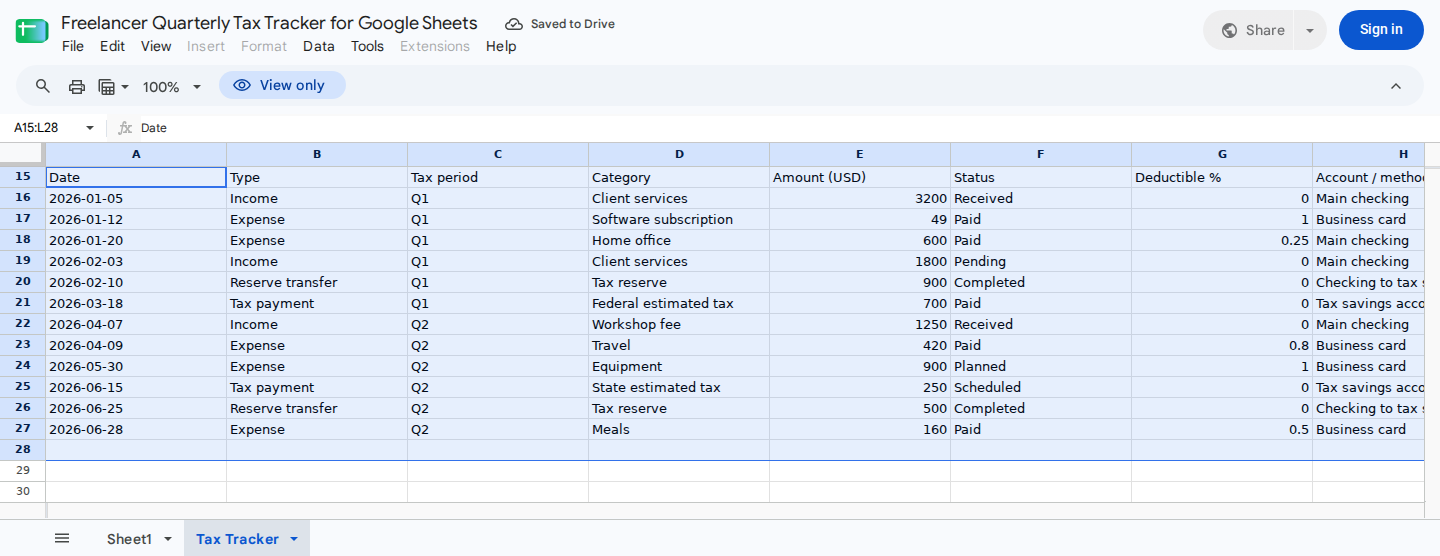
The example log includes received and pending income, paid and planned expenses, completed reserve transfers, and paid and scheduled tax payments.
For separate supporting registers, see the self-employed income tracker and freelance expense tracking workflow.
Verify the copied baseline
Start with a fresh template copy and leave its example rows unchanged. Recorded Google Sheets execution produced these results:
| Summary cell | Expected result |
|---|---|
B9 Combined target reserve rate | Approximately 43.19% |
E3 Gross income received | $4,450.00 |
E4 Deductible expenses paid | $615.00 |
E5 Estimated net profit | $3,835.00 |
E6 Estimated tax reserve need | $1,656.34 |
E7 Tax payments made | $700.00 |
E8 Remaining estimated liability | $956.34 |
E9 Tax-reserve cash balance | $1,900.00 |
E10 Reserve funding gap | $0.00 |
E11 Reserve coverage ratio | 1.99 |
The control totals reconcile as follows:
Net profit:          $4,450 - $615 = $3,835
Reserve need:        $3,835 × 0.4319 = $1,656.34, rounded
Remaining liability: $1,656.34 - $700 = $956.34
Coverage:            $1,900 ÷ $956.34 = 1.99, rounded
Reserve cash also reconciles:
Opening reserve cash:        $1,200
Completed reserve transfers:   $900 + $500
Cleared tax payment:           ($700)
Closing reserve cash:         $1,900
The linked template contains the detailed baseline transactions and formula expressions. These totals serve as verification targets for a fresh copy, but they aren’t enough to reconstruct the workbook from a blank sheet.
In a separate recorded case, B5:B8 were set to zero. That test produced zero in B9, E6, E8, E10, and E11 without a division error. Coverage is mathematically undefined when liability is zero, so the displayed zero is a workbook convention.
Reproduce a new-income update
Begin with a fresh baseline copy and enter this received Q3 retainer:
| Cell | Value |
|---|---|
A28 | 2026-07-08 |
B28 | Income |
C28 | Q3 |
D28 | Monthly retainer |
E28 | 2100 |
F28 | Received |
G28 | 0 |
H28 | Main checking |
I28 | Cedar Works / INV-1003 |
Leave J28:L28 untouched. Recorded Google Sheets execution for this entry produced:
| Cell | Expected result |
|---|---|
J28 Recognized income | $2,100.00 |
K28 Deductible expense | $0.00 |
L28 Reserve movement | $0.00 |
E3 Gross income | $6,550.00 |
E4 Deductible expenses | $615.00 |
E5 Net profit | $5,935.00 |
E6 Reserve need | $2,563.33 |
E7 Tax payments | $700.00 |
E8 Remaining liability | $1,863.33 |
E9 Reserve cash | $1,900.00 |
E10 Funding gap | $0.00 |
E11 Coverage | 1.02 |
K6 Q3 tax paid | $0.00 |
L6 Remaining Q3 plan | $700.00 |
The retainer increases recognized income and the reserve estimate. Q3 tax paid remains zero because the row records income, not a tax payment.
You may also update B4 to 2026-07-08 to record the review date. That change wasn’t part of the recorded execution case, and it doesn’t control whether the transaction enters the calculation.
For a separate status check, return to a fresh baseline and change the pending $1,800 invoice in F19 to Received. The recorded results were:
- Gross income: $6,250
- Net profit: $5,635
- Reserve need: $2,433.76
- Remaining liability: $1,733.76
- Coverage: 1.10
These results apply only to the stated inputs. They don’t establish how misspelled labels, negative amounts, invalid percentages, duplicate payments, or other unsupported entries will behave.
Review the quarterly payment plan
The example plan contains:
| Quarter | Example review/due date | Planned | Paid | Remaining |
|---|---|---|---|---|
| Q1 | 2026-04-15 | $700 | $700 | $0 |
| Q2 | 2026-06-15 | $650 | $0 | $650 |
| Q3 | 2026-09-15 | $700 | $0 | $700 |
| Q4 | 2027-01-15 | $700 | $0 | $700 |
Edit planned payments in J4:J7. Paid amounts appear in K4:K7 based on logged Tax payment rows that are marked Paid and assigned to the corresponding quarter. The unpaid portion of each plan appears in L4:L7.
Payments entered only in B11 affect E7, but they don’t appear in K4:K7. Reconcile that difference instead of recording the same payment twice.
The displayed dates are unverified examples. Check current IRS estimated-tax guidance and the applicable state or local authority before editing I4:I7.
A Scheduled payment doesn’t reduce estimated liability. Change its status to Paid only after it clears.
Refresh the tracker weekly or monthly
At each review:
- Update the manual review date in
B4. - Confirm that every transaction belongs to the tax year in
B3. - Add newly received income and paid expenses.
- Keep pending or planned items only when you want them visible for follow-up.
- Change statuses only when the related cash activity occurs.
- Record completed transfers into the reserve account.
- Record tax payments after they clear.
- Review
E8:E11for remaining liability, reserve cash, funding gap, and coverage. - Review
L4:L7for unpaid quarterly plans. - Reconcile the tracker with reserve-account statements and payment confirmations.
The reserve calculation assumes completed transfers move money into the reserve account and paid taxes leave that account. However, the supplied structure has no field for transfer direction or payment funding source. If you withdraw reserve cash or pay taxes from another account, E9 may not match the actual reserve balance.
Handle the 15-record limit
The transaction log holds 15 records in rows 16 through 30. The supplied material doesn’t include every formula expression needed for a safe, drop-in procedure that extends the log beyond row 30.
Workbook notes identify E3:E9 and K4:K7 as areas that can contain transaction references ending at row 30. Any extension also needs corresponding formulas in columns J:L. Updating only selected ranges could omit transactions or change the existing criteria.
For another 15-record batch, you can duplicate the sheet, retain J16:L30, replace A16:I30, and carry the previous closing reserve cash from E9 into B10. Before using the copy:
- Reset
B11to zero unless it represents a specific pre-batch tax payment that won’t also appear in the new log. - Check that no payment carried through
B11is repeated inA16:I30. - Treat
K4:K7as payments from the new batch only. They aren’t cumulative across copied sheets. - Don’t compare batch-only
K4:K7with annual plans retained inJ4:J7unless you separately reconcile earlier payments. - Treat
L4:L7as incomplete for annual planning when earlier quarterly payments are stored on another sheet.
The copied sheet becomes a batch-level view, not a complete annual tracker. Because replacing earlier transactions removes their income, deductions, and logged tax payments:
E3:E7no longer report complete annual activity.E6no longer reports the full-year reserve need.E8no longer reports the full-year remaining liability.E10no longer reports a valid annual funding gap.E11no longer reports valid annual reserve coverage.K4:L7no longer provide complete annual quarterly-payment results.
Carrying only the reserve balance into B10 doesn’t restore the omitted annual calculations. Keep copied batches as archived transaction segments unless you build and reconcile a cumulative annual summary outside them.
If you need one annual view with more than 15 records, inspect and update every affected formula range before extending the log. Afterward, check the expanded workbook against known totals for income, deductible expenses, tax payments, reserve cash, and quarterly payments.
For a new tax year:
- Duplicate the sheet.
- Change
B3:B4. - Clear prior inputs from
A16:I30. - Retain formulas in
J16:L30. - Reset
B10:B11to valid opening amounts. - Replace
I4:J7with newly verified dates and payment plans.
Review unusual inputs manually
The recorded cases don’t establish how every possible entry is handled. Review these items yourself:
- Blank, whitespace-only, misspelled, or differently cased labels
- Unexpected values introduced through pasting or importing
- Negative amounts
- Deductible shares below
0or above1 - Quarter assignments that conflict with transaction dates
- Transactions outside the stated tax year
- Transactions dated after the manual review date
- Payments entered in both
B11and the log - Reserve withdrawals or tax payments funded elsewhere
- Differences between
E7and quarterly totals whenB11is nonzero
The template has no bank connection, receipt import, deadline verification, filing automation, or tax-agency integration. Transaction entry, status updates, deductible percentages, reserve rates, and payment dates all require manual review.
Where ModelMonkey fits
ModelMonkey can inspect spreadsheet ranges, help organize entries, analyze calculated results, and propose changes in Google Sheets or Excel. For this workbook, you could ask:
Review
Tax Tracker!A16:L30. List pending income, planned expenses, scheduled tax payments, and entries that don’t use the documented types, statuses, or deductible-share range. Then summarizeE8:E11.
When the workflow provides a preview, review proposed changes before proceeding. ModelMonkey provides spreadsheet assistance, not guaranteed tax accuracy, filing services, or professional tax advice.